

Fix "550 Sender verify failed"
This rejection means the address you are sending from does not exist on the server, or the domain's email routing is set the wrong way. How to check both.
550 Sender verify failed is the receiving server refusing your message because
it could not confirm the From address is real. Applies to shared, reseller
and cPanel hosting.
There are two causes, and they are checked in different places.
Cause 1: the sending address does not exist
The most common case. Something is sending as you@example.com, but no mailbox
by that name exists in cPanel — often because the address was only ever set up
inside a mail app, or a contact form was configured with an address nobody
created.
- Log in to cPanel.
- Open Email Accounts.
- Confirm the address you are sending from is listed.
If it is not there, create it. If it is there, check that your mail app is authenticating with that exact address as the username and the correct mailbox password — see Fix "550 Please turn on SMTP Authentication".
Cause 2: email routing is set the wrong way
This is what catches people out after moving mail to Google Workspace, Microsoft 365 or any other external provider.
Changing the MX records at your registrar tells the outside world where to deliver mail. It does not tell your own server. Until you also change email routing in cPanel, the server assumes it still handles mail for the domain, looks for a local mailbox that no longer exists, and rejects the message.
- Log in to cPanel.
- Open Zone Editor, select the domain, then Manage.
- Find the Email Routing configuration.
- Set it to Remote Mail Exchanger.
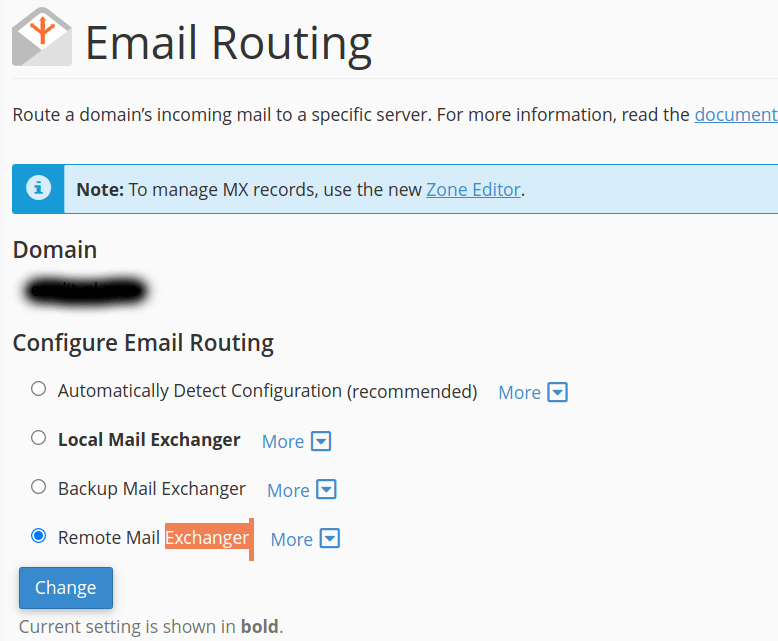
If mail for the domain is handled by WebGee, this must be Local Mail Exchanger instead. Getting it backwards produces the same error from the opposite direction.
See Configure email routing in cPanel for the full procedure.
Addon and parked domains each have their own routing setting and do not inherit it from the main domain. If the error affects one domain on an account and not the others, this is almost always why.
Verify
Send a test message from the affected address and confirm it is accepted. If it
still fails, check the full rejection text — a different 550 code points
somewhere else entirely. See
Read email headers.
Related
Get the full headers of an email
Find the raw headers of a message in webmail, Gmail, Outlook, Apple Mail or Thunderbird — what support needs to trace a delivery problem.
Fix "550 Please turn on SMTP Authentication"
The server rejected your message because it was not authenticated. How to turn on SMTP authentication in common mail apps, and what to check if it is already on.