

Configure email routing in cPanel
Tell your server whether it handles mail for a domain or passes it to an external provider — the setting that MX records alone do not change.
Email routing decides what your own server does with mail for a domain. Applies to shared, reseller and cPanel hosting.
This is separate from your MX records. MX records tell the outside world where to deliver mail; routing tells the server on which your domain is hosted whether to keep that mail or pass it on. Changing one without the other is the most common cause of mail vanishing after a migration.
The four options
| Option | What the server does |
|---|---|
| Local Mail Exchanger | Delivers to a mailbox on this server |
| Remote Mail Exchanger | Passes mail to whatever the domain's MX record points at |
| Backup Mail Exchanger | Behaves as remote, but delivers locally if the remote provider is unreachable |
| Automatically Detect Configuration | Chooses based on the current MX record |
Use Local if WebGee hosts your mailboxes. This remains correct when spam filtering is in front of the server — filtering changes where mail is scanned, not where it is finally delivered.
Use Remote if your mail is with Google Workspace, Microsoft 365 or any other external provider.
Avoid Automatically Detect Configuration. It re-reads the MX record and can change behaviour underneath you when DNS is mid-propagation or a record is edited. Choose Local or Remote explicitly so the setting cannot drift.
Backup Mail Exchanger sounds like a safety net but rarely is. Mail delivered locally during an outage stays in a local mailbox your users are not reading, and does not appear at the external provider afterwards. Use it only if you intend to check both places.
Change the setting
-
Log in to cPanel.
-
In the Email section, open Email Routing.
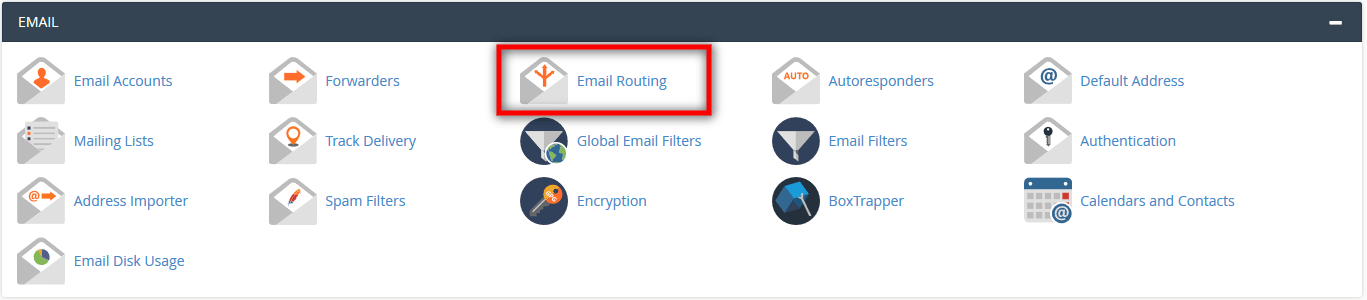
-
Select the domain. If the account has only one, it is chosen for you.
-
Under Configure Email Routing, select the option you need.
-
Select Change.
Each addon and parked domain has its own routing setting. They do not inherit from the main domain, so check every domain that handles mail.
Verify
Send a message to an address on the domain from an outside account, then confirm it arrives where you expect — in the local mailbox for Local, or at your external provider for Remote.
If sending fails with 550 Sender verify failed, routing is set the wrong way.
See Fix "550 Sender verify failed".
Related
Migrate email from another provider
Copy mailboxes from any IMAP provider into WebGee using the Migration Center, without losing folder structure or read state.
Use Google Workspace for your email
Point your domain's email at Google Workspace by setting cPanel to remote mail exchanger and replacing the MX records.