

Publish a DMARC record
Add a DMARC TXT record to your domain so receiving servers know what to do with mail that fails SPF and DKIM, and so you get reports about it.
Publish a DMARC record for your domain. Applies to shared, reseller and Premium hosting.
DMARC builds on SPF and DKIM. Those two say whether a message is authentic; DMARC tells receiving servers what to do when it is not, and asks them to report back.
Before you begin
DMARC does nothing without SPF and DKIM in place first — a DMARC record on a domain with no SPF will start failing your own legitimate mail.
-
SPF — see SPF records for WebGee hosting
-
DKIM — enabled per domain under cPanel → Email Deliverability
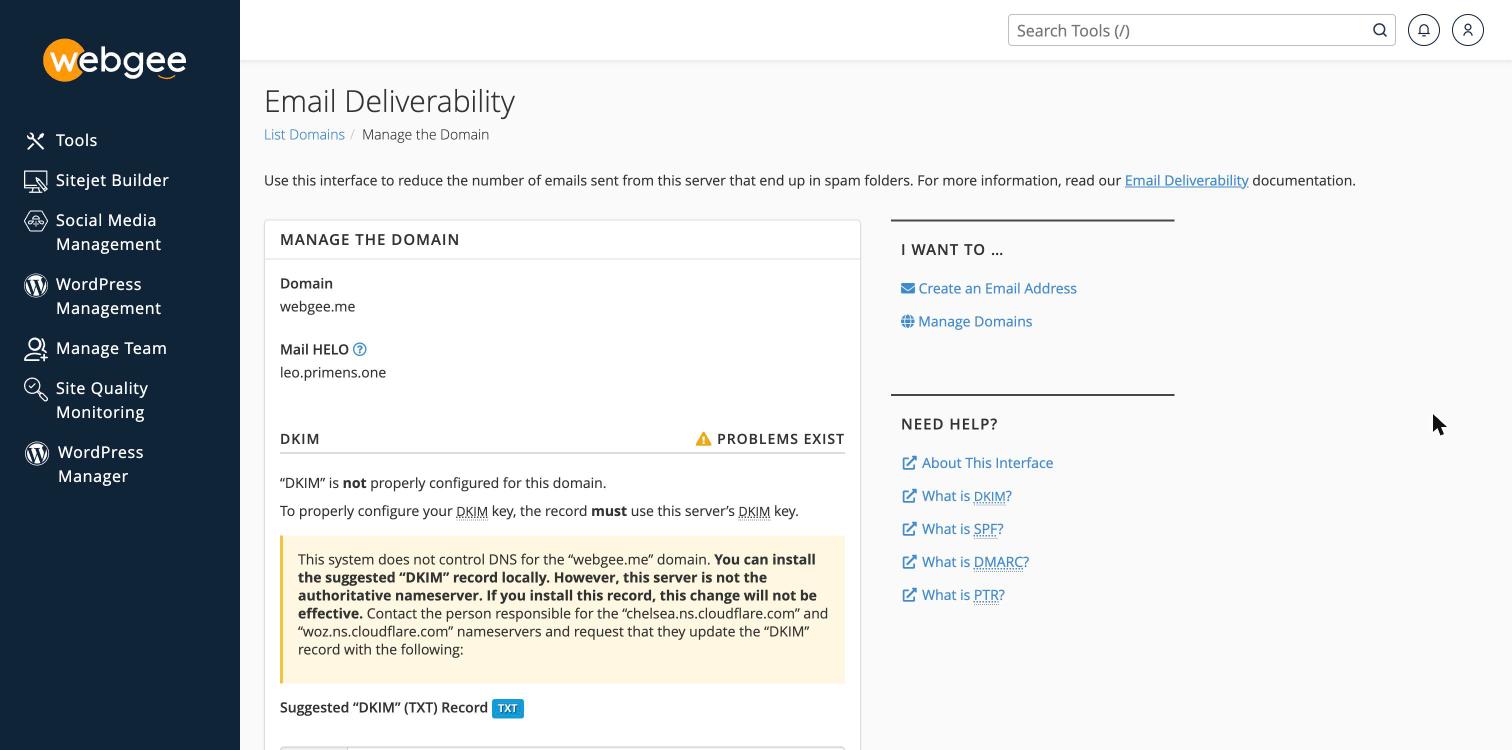
Check both show as valid under cPanel → Email Deliverability before continuing.
Add the record
The quickest route is Email Deliverability, which builds the record for you.
-
In cPanel, open Email Deliverability and select Manage beside your domain.
-
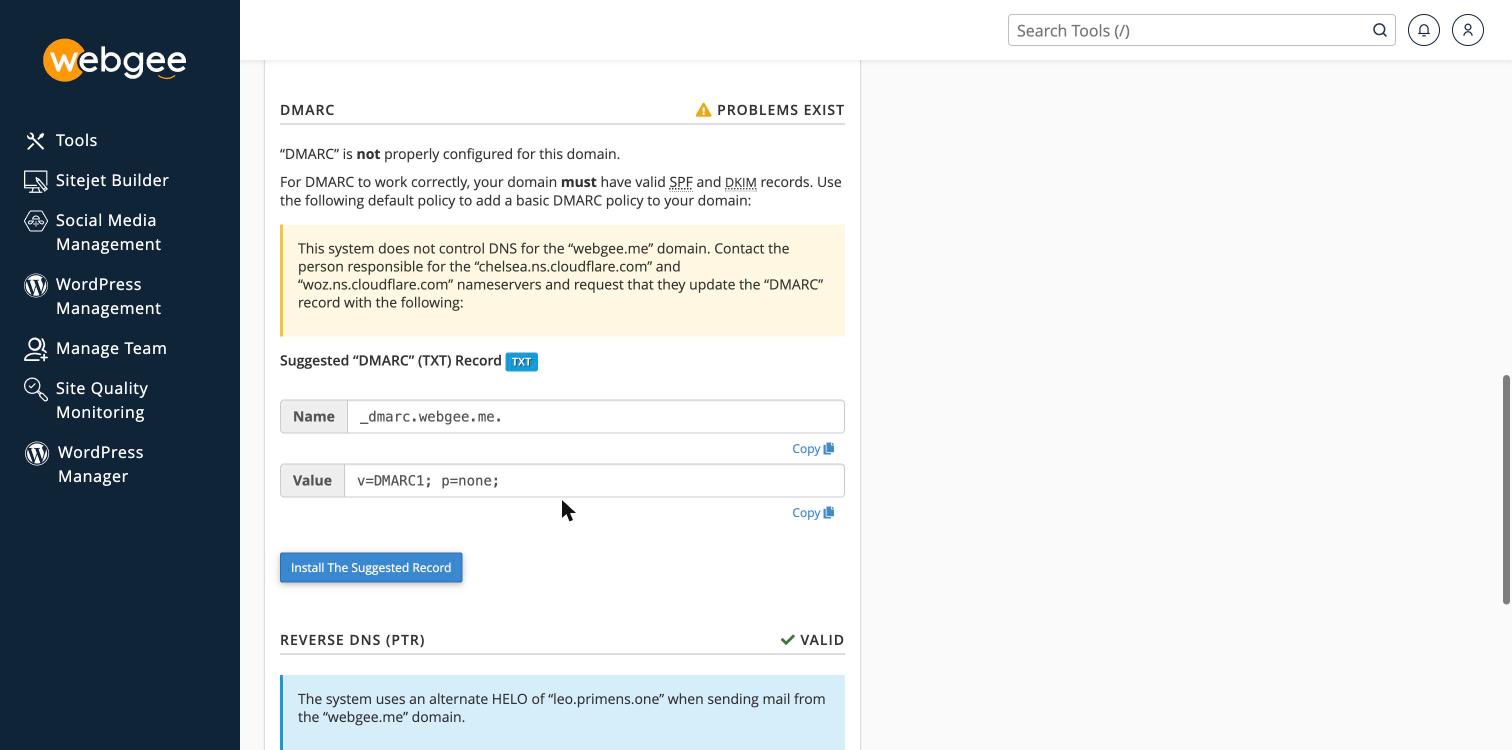
Scroll to the DMARC section.
-
Select Install The Suggested Record.
The suggested record is v=DMARC1; p=none; — monitoring only, which is the
right place to start. Add a reporting address afterwards, as below.
If your nameservers are not WebGee's, cPanel warns that it does not control DNS for the domain and that installing the record will not be effective. The button still works and still reports success — it writes to a zone nothing queries. Add the record at your actual DNS provider instead.
Or add it by hand
Where DNS is in cPanel and you want a specific value:
-
In cPanel, open Zone Editor under Domains.
-
Select Manage beside your domain.
-
Add a record:
Field Value Type TXTName _dmarcTTL 3600Value see below -
Select Add Record.
Choose a policy
Start permissive and tighten later. A strict policy published before you know what is sending on your behalf will silently reject your own mail.
Start here — monitor only, changes nothing about delivery:
v=DMARC1; p=none; rua=mailto:dmarc@example.comThen, once reports show only legitimate sources failing:
v=DMARC1; p=quarantine; pct=100; rua=mailto:dmarc@example.comFinally, when you are confident:
v=DMARC1; p=reject; pct=100; rua=mailto:dmarc@example.com| Tag | Meaning |
|---|---|
p=none | Take no action, just report |
p=quarantine | Deliver failures to spam |
p=reject | Refuse failures outright |
rua= | Where aggregate reports are sent |
pct= | Percentage of mail the policy applies to |
Do not start at p=reject. Marketing platforms, invoicing systems, CRMs and
helpdesks commonly send as your domain. Any that are not covered by your SPF
and DKIM will stop being delivered the moment you publish it — with no bounce
you will see.
Check it worked
dig +short TXT _dmarc.example.comYour record should come back. DNS changes take up to an hour to propagate.
You can also confirm it under cPanel → Email Deliverability, which validates SPF, DKIM and DMARC together.
Reading the reports
The address in rua= receives daily XML reports from receiving providers. They
are not readable by hand — paste one into any free DMARC report analyser, or use
a monitoring service.
You are looking for sources that are sending as your domain and failing. Each is either something legitimate you need to add to SPF, or someone spoofing you.
Related
Set your SPF record
Let cPanel generate the correct SPF record for your account, rather than copying one from documentation that may name the wrong relay.
Email sending limits
The hourly outbound limits for each WebGee plan, what counts towards them, and why marketing email must go through a separate service.