

نشر سجل DMARC
أضف سجل DMARC نصيًا إلى نطاقك لتعرف الخوادم المستقبِلة ماذا تفعل بالبريد الذي يفشل في SPF وDKIM، ولتحصل على تقارير عنه.
انشر سجل DMARC لنطاقك. ينطبق على الاستضافة المشتركة والموزِّعة والمميّزة.
يُبنى DMARC على SPF وDKIM. فهذان يقولان إن كانت الرسالة أصيلة؛ أما DMARC فيخبر الخوادم المستقبِلة ماذا تفعل حين لا تكون كذلك، ويطلب منها الإبلاغ.
قبل أن تبدأ
DMARC لا يفعل شيئًا دون وجود SPF وDKIM أولًا — فسجل DMARC على نطاق بلا SPF سيبدأ بإفشال بريدك المشروع أنت.
-
SPF — راجع سجلات SPF لاستضافة WebGee
-
DKIM — يُفعَّل لكل نطاق ضمن cPanel ← Email Deliverability
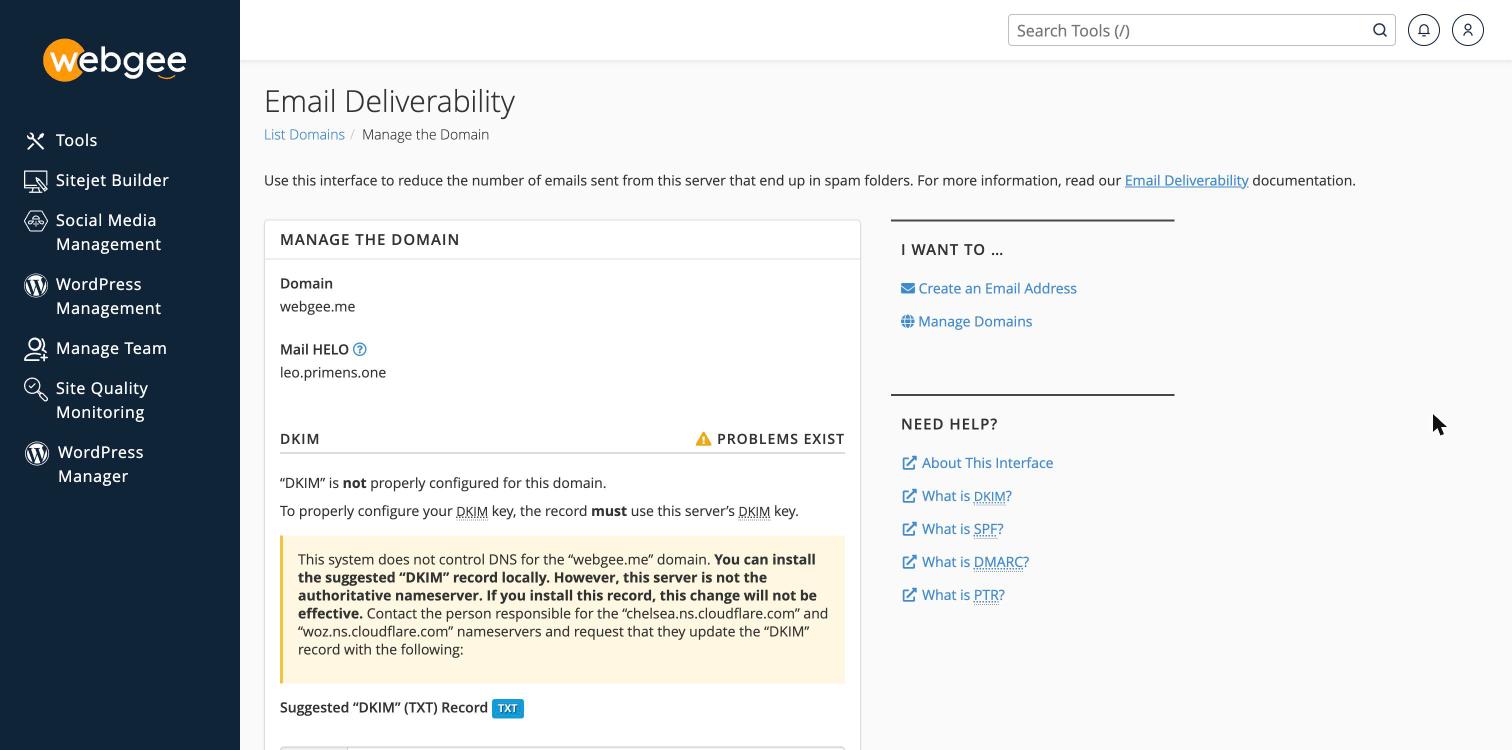
تأكّد أن كليهما يظهر صالحًا ضمن cPanel ← Email Deliverability قبل المتابعة.
أضف السجل
أسرع طريق هو Email Deliverability، فهو يبني السجل لك.
-
في cPanel، افتح Email Deliverability واختر Manage بجوار نطاقك.
-
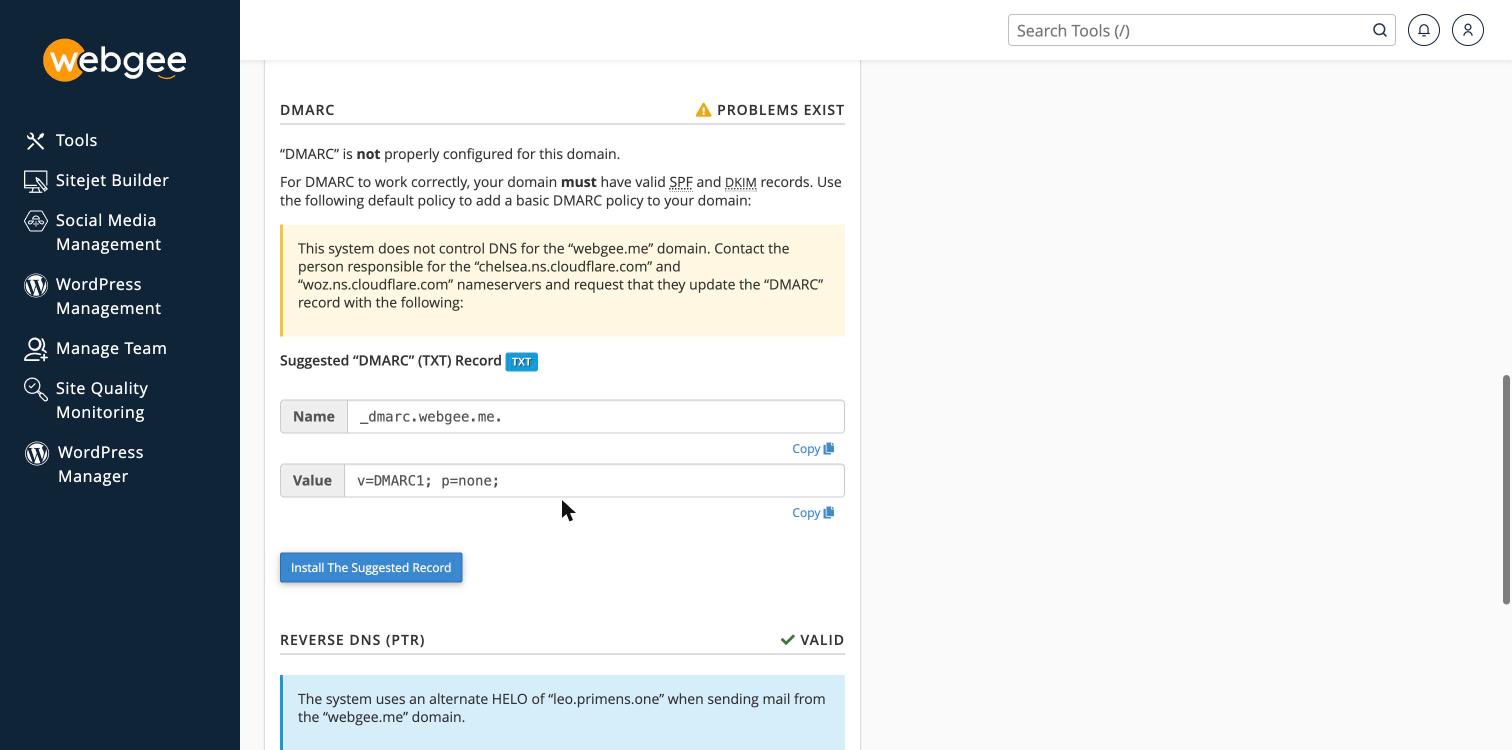
مرّر إلى قسم DMARC.
-
اختر Install The Suggested Record.
والسجل المقترَح هو v=DMARC1; p=none; — للمراقبة فقط، وهي البداية الصحيحة. أضف
عنوان تقارير بعد ذلك، كما أدناه.
إن لم تكن خوادم أسمائك خوادم WebGee، فيحذّر cPanel من أنه لا يتحكم في DNS للنطاق وأن تثبيت السجل لن يكون فعّالًا. ويظل الزر يعمل ويُبلغ بالنجاح — فهو يكتب في منطقة لا يستعلمها شيء. أضف السجل عند مزوّد DNS الفعلي لديك.
أو أضفه يدويًا
حيث يكون DNS في cPanel وتريد قيمة بعينها:
-
في cPanel، افتح Zone Editor ضمن Domains.
-
اختر Manage بجوار نطاقك.
-
أضف سجلًا:
الحقل القيمة النوع TXTالاسم _dmarcTTL 3600القيمة انظر أدناه -
اختر Add Record.
اختر سياسة
ابدأ متساهلًا وشدّد لاحقًا. فالسياسة الصارمة المنشورة قبل أن تعرف ما يرسل نيابةً عنك سترفض بريدك أنت بصمت.
ابدأ هنا — مراقبة فقط، ولا تغيّر شيئًا في التسليم:
v=DMARC1; p=none; rua=mailto:dmarc@example.comثم، بعد أن تُظهر التقارير أن المصادر المشروعة وحدها هي التي تفشل:
v=DMARC1; p=quarantine; pct=100; rua=mailto:dmarc@example.comوأخيرًا، حين تطمئن:
v=DMARC1; p=reject; pct=100; rua=mailto:dmarc@example.com| الوسم | المعنى |
|---|---|
p=none | لا تتخذ إجراءً، وأبلِغ فقط |
p=quarantine | سلّم الفاشل إلى السبام |
p=reject | ارفض الفاشل مباشرة |
rua= | إلى أين تُرسَل التقارير المجمَّعة |
pct= | نسبة البريد التي تنطبق عليها السياسة |
لا تبدأ بـ p=reject. فمنصات التسويق وأنظمة الفوترة وأنظمة إدارة العملاء
ومكاتب المساعدة كلها ترسل باسم نطاقك عادةً. وكل ما لا يغطّيه SPF وDKIM لديك
سيتوقف تسليمه لحظة نشرك للسجل — دون ارتداد تراه.
تأكّد أنه نجح
dig +short TXT _dmarc.example.comوينبغي أن يعود سجلك. وتغييرات DNS تستغرق حتى ساعة للانتشار.
ويمكنك التأكيد كذلك ضمن cPanel ← Email Deliverability، فهو يتحقّق من SPF وDKIM وDMARC معًا.
قراءة التقارير
يستقبل العنوان في rua= تقارير XML يومية من المزوّدين المستقبِلين. وهي غير
قابلة للقراءة يدويًا — الصق أحدها في أي محلّل تقارير DMARC مجاني، أو استخدم خدمة
مراقبة.
وأنت تبحث عن مصادر ترسل باسم نطاقك وتفشل. وكل منها إما شيء مشروع عليك إضافته إلى SPF، أو أحدٌ ينتحل نطاقك.