

Packages and limits
Read your package usage — websites, staging sites, disk, bandwidth, mailboxes and databases — and see what counts against what.
A package is the allowance your websites draw from. Select Packages in the left navigation.
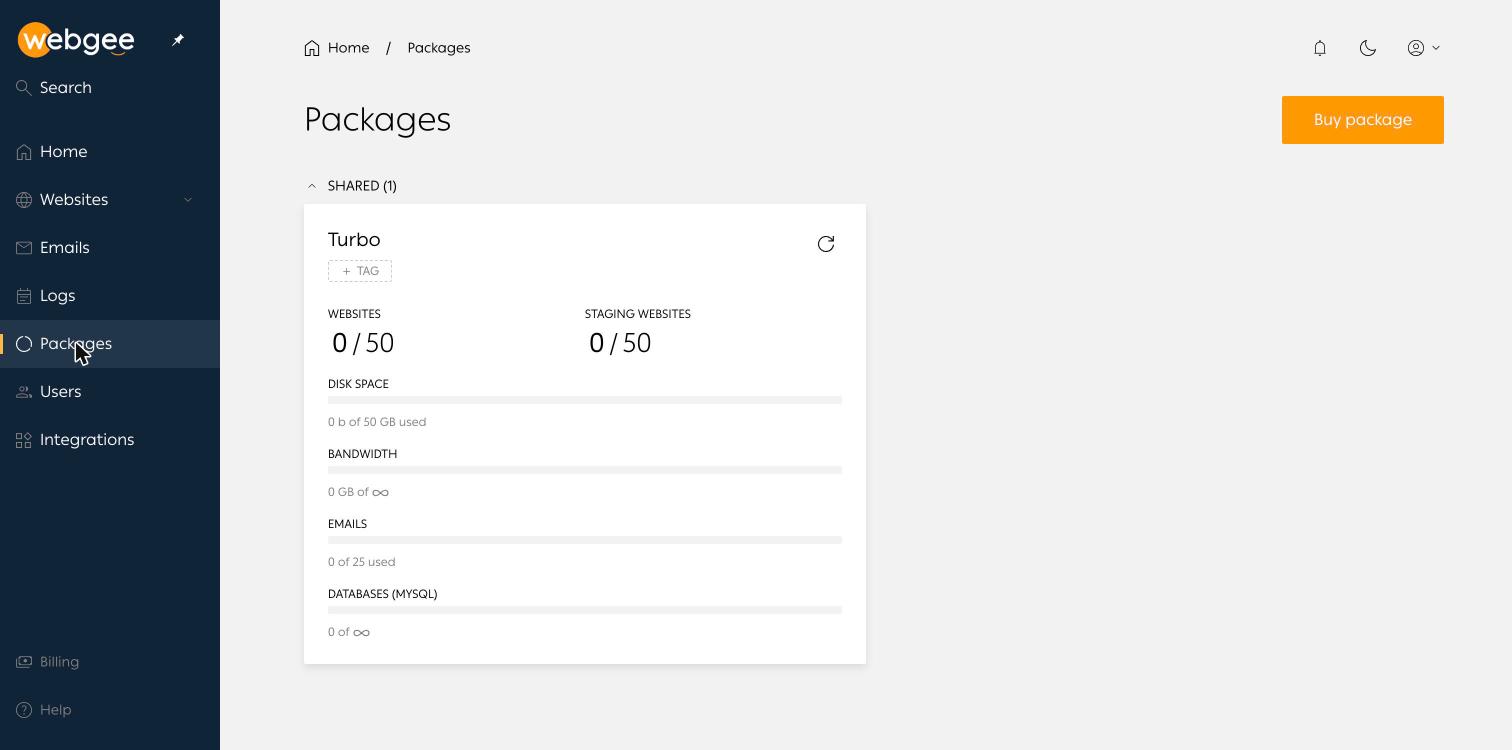
Packages are grouped by type, for example SHARED. Each card shows the package name and its current usage.
What is counted
| Resource | Notes |
|---|---|
| Websites | Production sites |
| Staging websites | Counted separately, so staging never consumes a production slot |
| Disk space | Files and databases across every site on the package |
| Bandwidth | Traffic served |
| Emails | Mailboxes. Forwarders are usually not counted |
| Databases (MySQL) | MariaDB databases |
Unlimited allowances show an infinity symbol rather than a number.
Where else usage appears
The same panel is repeated on each website's overview page, under Package usage, so you can see the effect of a site without leaving it.
Things that change the count
- Pushing a staging site live converts one staging slot into one production website.
- Deleting a website frees its slot, but the disk it used is only reclaimed once the container is removed.
- Installing a second application on an existing site creates another database, which counts, but not another website.
Tags
+ TAG labels a package. On accounts holding several, tags are how you tell which package belongs to which client or project.
Buy more
Buy package on the Packages page adds another. Refresh usage with the circular arrow on the card — the figures are cached rather than live.