

Trace a single email
Look up one message by Message-ID, Mail ID or recipient and follow it from WebGee to the receiving server, with the reply and what to do next.
Message Lookup finds one message and shows what happened to it for each recipient: when WebGee accepted it, when it was handed to the receiving server, and what that server said. Applies to all plans that send through the outbound relay.
Use it when you already know which message you are asking about — a customer quotes an order number, or you have a Message-ID from your application's log. To browse or filter many messages, use Email Logs instead.
Find the message
The quickest way is the search box at the top of every page:
- Paste a Message-ID, a Mail ID or a recipient address into Message-ID or recipient… in the header.
- Press Enter.
A value in angle brackets is searched as a Message-ID, a short code such as
1b83c16c as a Mail ID, a recipient address as a recipient, and anything else
as a Message-ID.
To choose the field and the dates yourself, open Message Lookup in the sidebar:
- Under Search by, select Message-ID, Mail ID or Recipient address.
- Enter the value in Search value.
- Set From date and To date to cover the day the message was sent. The default is the last 7 days.
- Select Search.
| Search by | Where to find the value | Date range |
|---|---|---|
| Message-ID | The Message-ID header of the email, or your application's log | Up to 31 days |
| Mail ID | WebGee's own ID, on the message page and in the Email Logs CSV export | Ignored — Mail IDs are unique |
| Recipient address | The address the person gave you | Up to 31 days |
When exactly one message matches, its page opens straight away. When several match, each is listed with its subject, sender and recipients; select one to open it.
Read the message page
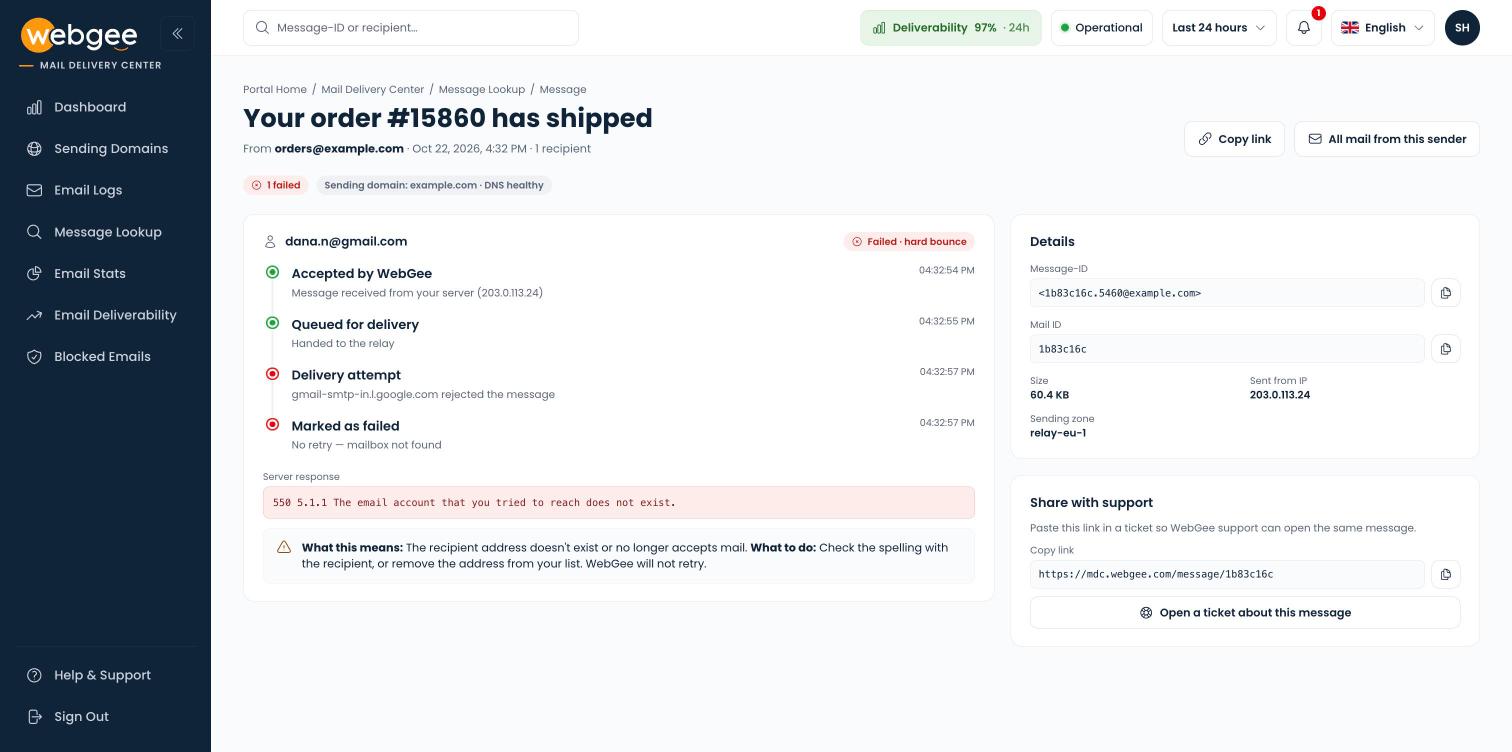
The heading is the message subject, with the sender, the date and the number of recipients beneath it. The pills under it summarise the outcome — for example 1 failed — and show your Sending domain with its DNS health. Select the domain pill to open that domain's DNS checks.
Each recipient gets its own card with a timeline:
| Step | Meaning |
|---|---|
| Accepted by WebGee | Your server handed the message to WebGee, from the IP shown |
| Queued for delivery | It was handed to the relay |
| Delivery attempt | The receiving server, named, accepted or rejected it |
| Delivered or Marked as failed | The final outcome, and whether WebGee will retry |
Under a failed recipient, Server response shows the receiving server's reply word for word. What this means puts that reply in plain words, and What to do says what to change — usually the recipient address, or your domain's DNS records.
The Details card holds the identifiers support may ask for:
| Field | Meaning |
|---|---|
| Message-ID | The identifier from the email's headers |
| Mail ID | WebGee's identifier for this message |
| Size | The message size |
| Sent from IP | The address your server sent it from |
| Sending zone | The part of the relay that delivered it |
Ask support about a message
- In Share with support, select the copy button beside the link.
- Select Open a ticket about this message.
- Paste the link into the ticket.
WebGee support opens the same page, so you do not need to copy the reply or the IDs by hand.
If the message is not found
- Widen the dates. Message-ID and recipient searches only look inside the date range, and the range cannot be longer than 31 days.
- Try the Mail ID. Find the message in Email Logs and select Open message, or take the Mail ID column from its CSV export. A Mail ID search ignores the date range.
- Check the sender. Only mail sent from your own sending domains can be shown. A message from an address on another domain never appears.
If the message is still missing, it never reached WebGee. The problem is in your application or mail client — see Why mail from your PHP script fails.
Related
Email logs
Find a message by sender, recipient or subject, filter by outcome, read the receiving server's reply, and export every matching row as CSV.
Email deliverability
See your delivery rate for Gmail, Microsoft, Yahoo and other providers, how it changed day by day, and which sending domain needs fixing.