

What's new in the Mail Delivery Center
The October 2026 Mail Delivery Center release — one time range for every page, message timelines, DNS health with exact records, and per-provider delivery.
The Mail Delivery Center was rebuilt in October 2026. It now looks and behaves like the WebGee client area, tells you why mail failed rather than only that it did, and gives you the exact DNS record to fix a domain. Applies to all plans that send through the outbound relay.
You sign in the same way and see the same mail as before. Nothing needs to be set up to start using the new pages.
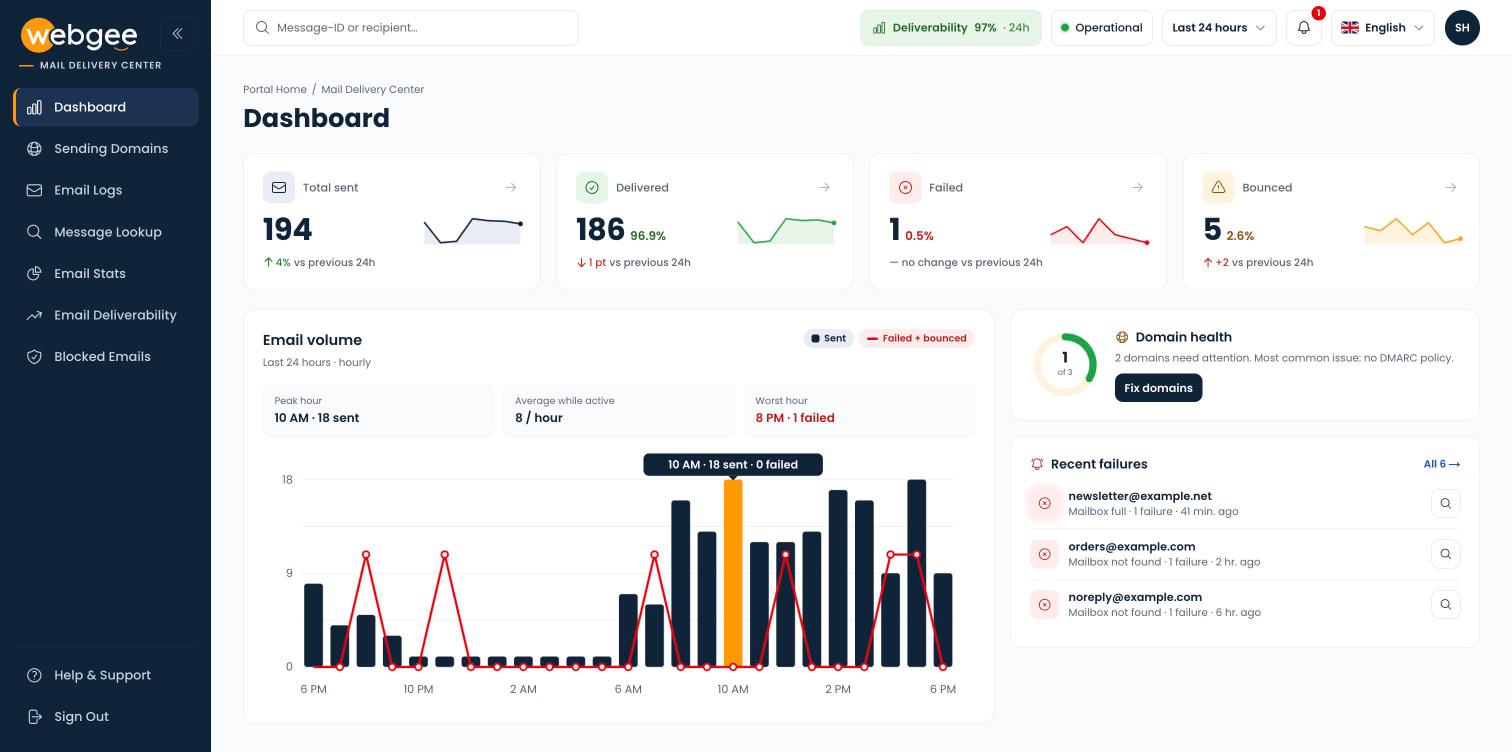
A layout that matches the client area
The sidebar, header and page layout now follow the WebGee client area, so moving between the two feels like one place. The sidebar can be collapsed to icons with the button beside the logo.
One time range for every page
The separate timeframe and date pickers on each page are gone. A single time range in the header — Last 24 hours, Last 7 days, Last 30 days, This billing period or a custom range — now applies to every page, and stays set as you move between them. See Choose the time range.
Find one message from anywhere
Type a Message-ID, a Mail ID or a recipient address in the search box at the top of any page to open Message Lookup.
Each message now has its own page with a timeline for every recipient — accepted, queued, the delivery attempt and the result — plus the receiving server's exact response, what it means and what to do about it. Copy the page's link into a support ticket and WebGee support can open the same message.
A dashboard that says what changed
- Each card compares the period with the one before it and shows a seven-day sparkline.
- Failed and Bounced are now separated cleanly: temporary failures the relay retries, and permanent rejections it does not.
- The email volume chart marks your peak and your worst hour.
- Domain health and Recent failures sit beside the chart.
- New accounts see a setup checklist instead of empty charts.
See The dashboard.
DNS health with the exact record to add
Sending Domains now checks DKIM, DMARC and MX as well as SPF. Each domain has its own page showing the current record next to the one to publish, ready to copy, and a history of when each check passed or failed.
Domains are re-checked automatically every six hours. If one starts failing, an alert appears at the top of every page.
Faster email logs
Email Logs has one search box and status buttons — Delivered, Failed, Bounced and Pending — with a count on each. Expand a row to see every recipient, the server's response and the reason, without leaving the list. Export CSV exports every matching message, not just the page you are looking at.
Why mail failed, and where
- Email Stats opens on a breakdown of failures by reason — invalid recipient, mailbox full, spam or policy, rate limited — with what each means and what to do.
- Email Deliverability compares delivery to Gmail, Microsoft, Yahoo/AOL and everyone else, with a daily trend against the previous period.
Blocked emails in bulk
Blocked Emails now lets you select several addresses and unblock or export them together, and shows why each one was blocked and when.
Six languages and dark mode
The Mail Delivery Center is available in English, Arabic, French, German, Spanish and Chinese — pick one from the flag in the header. Arabic switches the whole layout to right-to-left. Dark mode is in the menu under your initials.
What has not changed
- You still reach it from Mail Delivery Center in the client area sidebar, or directly at mdc.webgee.com, with your client area email address and password.
- You see the same mail as before: messages sent from your own sending domains.
- Delivery itself is unchanged. This release changes how delivery is reported, not how mail is sent.
Related
Mail Delivery Center
See what happened to your outbound mail after it left the server — delivery rates, per-message timelines, domain DNS health and blocked addresses.
The dashboard
Read the four delivery counts, the email volume chart, your domain health and recent failures, and know which page to open next.