

ووردبريس Multisite بنطاقات فرعية
وجّه كل نطاق فرعي في Multisite إلى الجذر المستنَدي للشبكة في cPanel أو DirectAdmin، فتُحلّ المواقع بدل أن تعيد 404.
تحتاج شبكة ووردبريس Multisite التي تستخدم نطاقات فرعية أن يُنشأ كل نطاق فرعي في لوحة التحكم ويُوجَّه إلى الجذر المستنَدي للشبكة، لا إلى مجلد خاص به. ينطبق على الاستضافة المشتركة والموزِّعة على cPanel وDirectAdmin.
تقدّم Multisite كل المواقع من تثبيت ووردبريس واحد وتقرّر أي موقع تعرض من اسم المضيف في الطلب. فإن كان للنطاق الفرعي جذر مستنَدي خاص، لم يصل الطلب ووردبريس أصلًا وحصلت على مجلد فارغ أو خطأ 404.
cPanel
انتقل إلى Domains ← Create a new domain.
أدخل النطاق الفرعي واضبط الجذر المستنَدي على المجلد نفسه الذي فيه تثبيت Multisite.
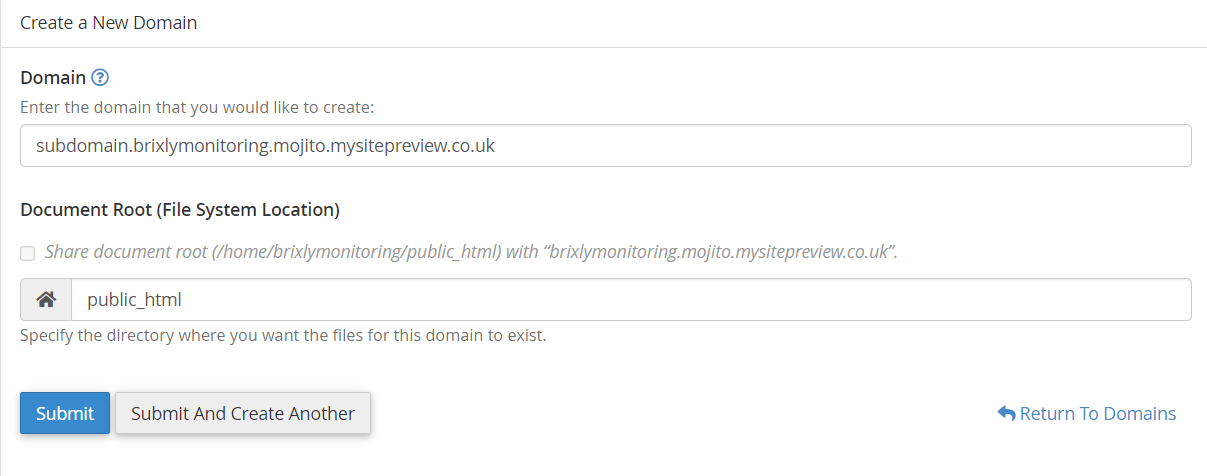
وذلك عادةً public_html. فإن كانت الشبكة تعمل على نطاق مضاف، فاستخدم مجلد ذلك
النطاق بدلًا منه.
يقترح cPanel مجلدًا فرعيًا جديدًا جذرًا مستنَديًا افتراضيًا، مثل
public_html/shop. وقبوله هو ما يعطّل Multisite. استبدله بالجذر المستنَدي
للشبكة.
تصحيح نطاق فرعي قائم
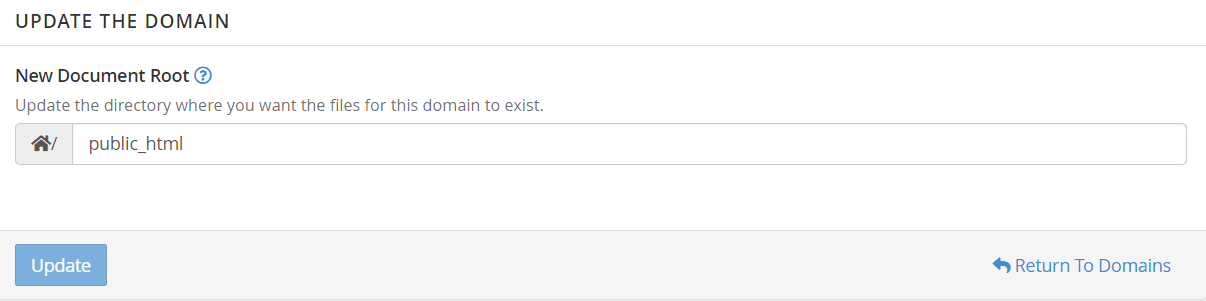
إن كان النطاق الفرعي موجودًا بجذر خاطئ، فاختر Manage بجواره في شاشة Domains.

اضبط الجذر المستنَدي الجديد واختر Update.
DirectAdmin
انتقل إلى Subdomain Management ← Add Subdomain على مستوى المستخدم.
وينشئ DirectAdmin دائمًا جذرًا مستنَديًا خاصًا به، في
/domains/yourdomain/public_html/subdomain، فيجب تصحيح ذلك بعد الإنشاء لا
أثناءه.
- اختر أيقونة القلم بجوار Docroot للنطاق الفرعي الجديد.
- اضبط public_html وprivate_html على مخصّص، وكلاهما يشير إلى الجذر المستنَدي لتثبيت Multisite.
- احفظ.

واسمح بدقائق كي يعيد DirectAdmin بناء إعداداته قبل الاختبار.
فكّر في نطاق شامل بدلًا من ذلك
إضافة نطاق فرعي يدويًا لكل موقع لا تتوسّع، ومن السهل نسيانها حين تتيح شبكة للمستخدمين إنشاء مواقعهم.
فالنطاق الفرعي الشامل — *.yourdomain.com موجَّهًا إلى الجذر المستنَدي للشبكة —
يغطّي كل موقع، حاضرًا ومستقبلًا، بمدخل واحد. أعِدّه بالطريقة نفسها، مستخدمًا *
اسمًا للنطاق الفرعي. وستحتاج كذلك سجل DNS شاملًا، ولـ HTTPS شهادة شاملة.
تحقّق
- يُحمَّل النطاق الفرعي موقعه في Multisite لا قائمة مجلدات ولا 404.
- يظهر بشكل صحيح ضمن My Sites ← Network Admin ← Sites.
- يعمل HTTPS. فالشهادة القياسية لا تغطّي النطاقات الفرعية؛ افحص القفل على نطاق فرعي لا على النطاق الرئيسي وحده.