

Create a reseller account in WHM
Create a WHM reseller account for a customer from a VPS or dedicated server with root access, and give them their own WHM login.
Create a reseller account so a customer can create and manage their own cPanel accounts. Applies to VPS and dedicated servers with root WHM.
A reseller is a cPanel account with extra privileges: it can create cPanel accounts of its own, within limits you set.
Before you begin
You need root WHM on a VPS or dedicated server. Reseller plans on shared hosting cannot create further resellers — that requires root.
Decide in advance what the reseller may consume, since you will set it during creation: disk space, bandwidth, and how many accounts they may create.
Create the account
-
Sign in to WHM as root.
-
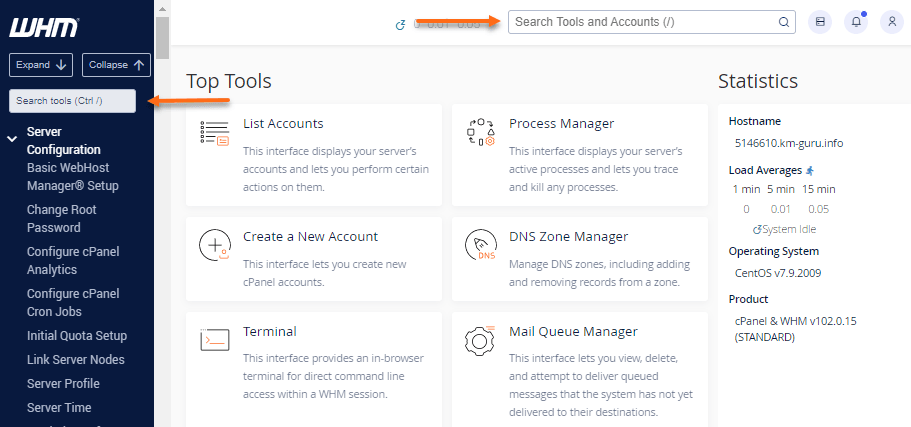
Search for Create a New Account — the search box in the left sidebar is quickest.
-
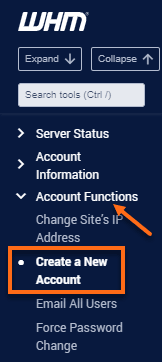
Select Create a New Account under Account Functions.
-
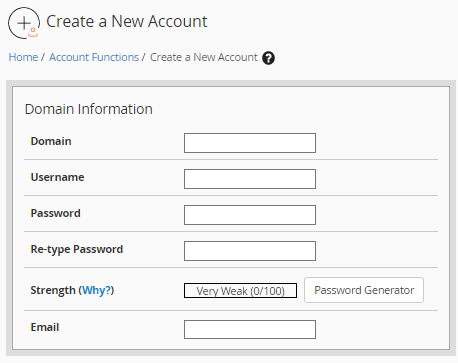
Fill in the domain, username, password and contact email.
-
Under Reseller Settings, tick Make the account a reseller.
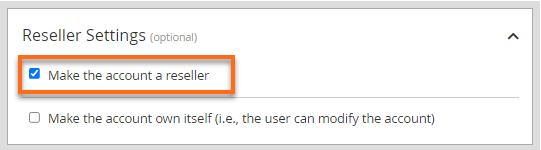
Also tick Make the account own itself if the reseller should be able to modify their own account. Without it, only root can change their settings — which means every limit change comes back to you.
-
Select Create.
Check it worked
The reseller can now sign in at https://theirdomain.com/whm with the username
and password you set. Ask them to confirm they can reach WHM and create a test
account.
Set their limits
Creating the account does not by itself cap what they can use. Set that separately under WHM → Reseller Center → Edit Reseller Nameservers and Privileges, and their resource ceilings under Reseller Center → Reseller Limits.
A reseller with no limits set can create accounts until the server runs out of disk. Set limits before handing over the credentials, not after.