

Storage
Read total and per-mailbox disk usage, understand how plan storage is shared, and know what to do before you run out.
The Storage tab shows how much of your plan's mail storage is in use, in total and per mailbox.
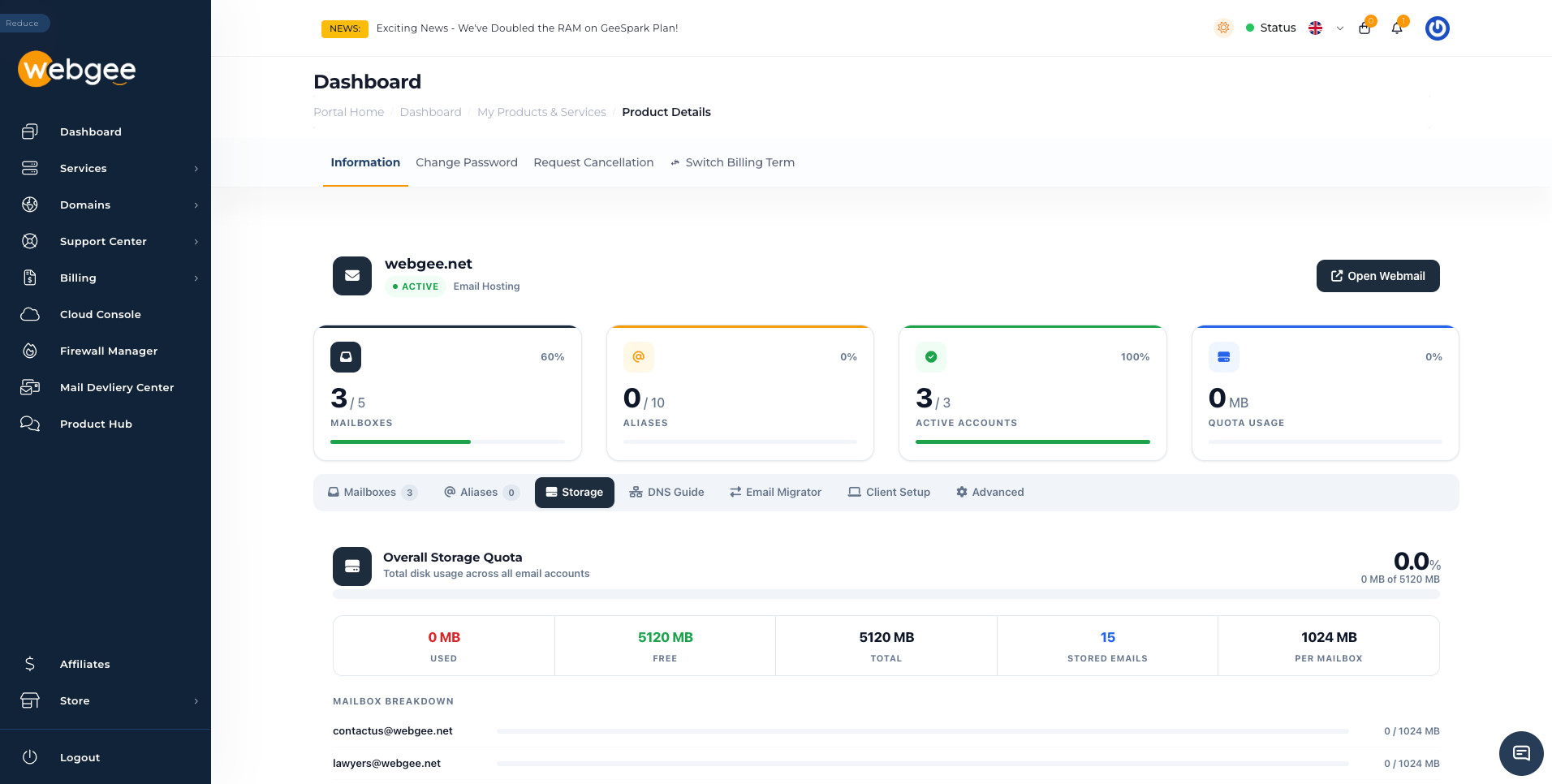
Overall quota
The summary row splits the plan total five ways:
| Figure | Meaning |
|---|---|
| Used | Mail currently stored across every mailbox |
| Free | What is left of the plan total |
| Total | Your plan's mail storage |
| Stored Emails | Message count across all mailboxes |
| Per Mailbox | The default quota applied to a new mailbox |
Per Mailbox is a default, not a division. Creating five mailboxes at a 1024 MB default on a 5120 MB plan happens to add up, but nothing stops you setting one mailbox to 4096 MB and leaving the rest to share what remains.
The breakdown
Below the summary, each mailbox gets a bar showing its own usage against its own quota.
That is where a problem shows itself before it becomes one. A single mailbox near its limit will start rejecting mail while the plan total still looks healthy, because the limit that applies is the mailbox's, not the plan's.
Running out
Two different situations, with different fixes:
One mailbox is full, the plan has room. Raise that mailbox's quota by editing it — see Manage mailboxes. Nothing else needs to change.
The plan total is full. Raising a quota will not help; there is nothing to raise it from. Either free space up, or move to a larger plan through Switch Billing Term or your client area.
Freeing space
In rough order of how much they return for the effort:
- Empty Trash and Junk folders. Both count towards the quota. On a mailbox that has run for a year this is often most of the problem.
- Delete large attachments. Sort by size in webmail or your mail client and work down from the top. A handful of messages usually accounts for a surprising share.
- Archive old mail locally. Copy folders to a local folder in a desktop client, then remove them from the server. The mail is kept; it just stops being stored on the plan.
- Delete mailboxes nobody uses. A
Last LoginofNeveron the Mailboxes tab is a good place to start — though replace it with an alias rather than leaving the address dead.
A full mailbox does not silently drop mail — the sending server is told the mailbox is over quota and generally retries for a few days before giving up. You have time to fix it, but not indefinitely.