

Install a wildcard certificate with Let's Encrypt
AutoSSL cannot issue wildcards. Use the Let's Encrypt tool in cPanel for *.example.com, and know the two prerequisites that block issuance.
Issue a certificate covering *.example.com — every subdomain, including ones
created later. Applies to shared, reseller and Premium hosting.
For an ordinary certificate you need do nothing; AutoSSL handles it. Use this when you specifically need a wildcard, which AutoSSL cannot issue.
When Let's Encrypt is the right choice
- Wildcard coverage — one certificate for all subdomains.
- Your domain is in a region Sectigo cannot serve. AutoSSL uses Sectigo, which is subject to US export restrictions — see Install a free SSL certificate.
- The site sits behind Cloudflare or another proxy. Let's Encrypt follows redirects during validation, which is often simpler in that setup.
Otherwise AutoSSL is preferable: it renews automatically with no involvement from you, and does not rate-limit issuance.
Issue one
-
In cPanel, open Let's Encrypt™ SSL.
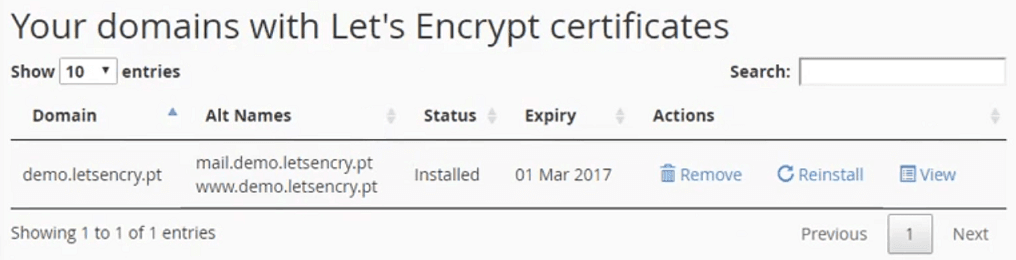
The upper section lists certificates already issued, with expiry dates and options to reinstall, view or remove them.
-
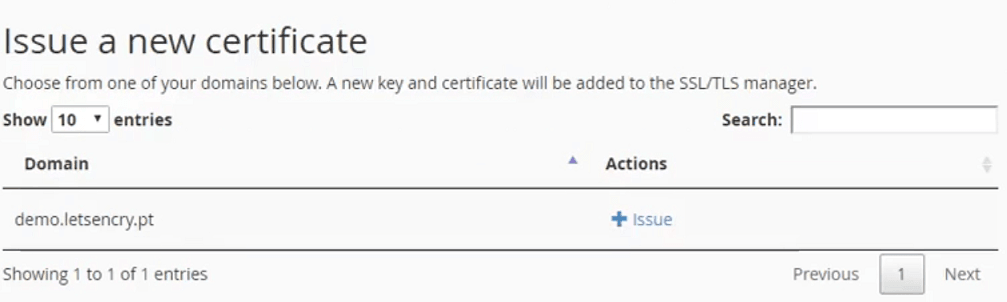
In the lower section, find the domain you want to cover.
-
Issue the certificate, including the wildcard entry for the domain.
Two things that block issuance
Both must be true or issuance fails, usually with a validation error that does not say which one is the problem.
The domain must resolve to this server. Validation works by proving control, which means fetching something from your account. A domain still pointing at a previous host cannot be validated — see Check which nameservers a domain uses.
Redirected domains cannot be issued a certificate. A domain configured as a redirect in cPanel has nowhere to serve the validation file from. Remove the redirect, issue the certificate, then reapply it.
Wildcards need DNS validation
A wildcard cannot be validated by fetching a file — there is no single hostname
to fetch it from. Validation is done with a DNS TXT record instead.
Where your DNS is hosted in cPanel, this is automatic. Where it is hosted
elsewhere — Cloudflare, or a registrar — you must add the TXT record there
manually when prompted, within the time the process allows.
Check it worked
echo | openssl s_client -connect anything.example.com:443 2>/dev/null \
  | openssl x509 -noout -subject -dates
The subject should show the wildcard, and the dates should be current. Or simply visit a subdomain that has no certificate of its own and confirm it loads without a warning.
Renewals
Let's Encrypt certificates last 90 days and renew automatically, provided the prerequisites above still hold. A domain that later moves away, or gains a redirect, will fail to renew silently — the first sign is usually an expiry warning in a browser.
Related
Disable ModSecurity
Turn off the web application firewall for a domain when it blocks legitimate requests — and why disabling the whole thing is the wrong first step.
Unblock an IP address from the firewall
Check whether your IP is firewall-blocked and remove the block yourself from the client area, without opening a ticket.