

Block visitors by country
Restrict site access by country using .htaccess or Cloudflare, and why the second is almost always the better option.
Block or allow visitors based on where they are. Applies to shared, reseller and Premium hosting.
Consider whether you need this. Country blocking is a blunt instrument: it blocks real customers, travellers and anyone using a VPN, while stopping determined attackers for about as long as it takes them to change exit node. If the goal is reducing bot traffic or brute-force attempts, a firewall rule or rate limit is more effective and has fewer side effects.
The better option: Cloudflare
If your site is behind Cloudflare, block there rather than in .htaccess:
- In Cloudflare, go to Security → WAF → Tools.
- Add a rule matching Country.
- Choose Block or Managed Challenge.
This is better in every practical respect. Blocked requests never reach your server, so they consume none of your entry processes; the country data is accurate and maintained; and you can change it instantly without editing files.
Managed Challenge is usually the right action rather than Block — a real person passes it, automated traffic does not.
See Put your site behind Cloudflare.
Using .htaccess
Where Cloudflare is not an option, block by IP range in .htaccess.
-
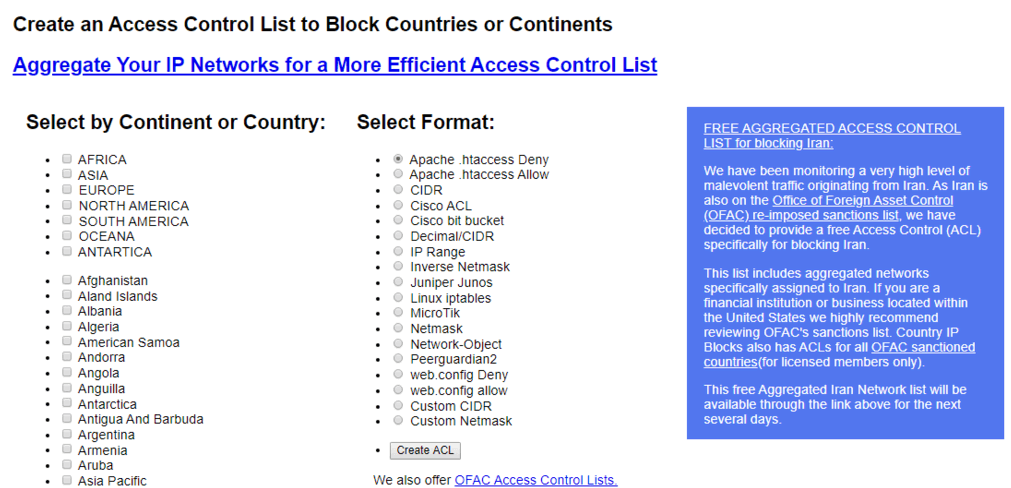
Use a service such as Country IP Blocks to generate the list.
-
Select the countries.
-
Choose the Apache .htaccess Deny format — or Allow if you are permitting a small set instead.
-
Generate and copy the result.
-
Paste it into
.htaccessin your document root.
These lists are long — often thousands of lines — and Apache evaluates them on every single request. A large list measurably slows your site, including for the visitors you are keeping. This is the main reason to prefer Cloudflare.
The ranges also go out of date. A list generated today is wrong within months.
Check it worked
Use an online proxy or a VPN endpoint in a blocked country and confirm you get a
403.
Check your own access still works before closing the editor. Blocking your own
country by accident locks you out of your site — though not out of cPanel, so
the fix is to edit .htaccess back.
Related
Scan your account with Virus Scanner
Run cPanel's ClamAV scan across your files or mail, choose the right scan target, and know what it can and cannot find.
Clear a "Deceptive site ahead" warning
Google blocks a compromised site until it re-checks. Clean it first, then request a review through Search Console.