

Redirect mixed-case URLs to lowercase
Capitalised URLs get their own LiteSpeed cache entry and miss it on every visit. One Cloudflare redirect rule points every request at a single lowercase URL.
Make every request for your site resolve to one lowercase URL, so LiteSpeed serves a single cached copy of each page instead of one copy per capitalisation.
Applies to any site on shared, reseller or Premium hosting that sits behind Cloudflare, on any Cloudflare plan including Free. You need access to the Cloudflare account the domain uses — see Put your site behind Cloudflare.
Why capitalisation splits the cache
LiteSpeed Cache keys each entry on the request URI as a literal string, so these are two separate entries:
https://example.com/Blog/My-Great-Article
https://example.com/blog/my-great-article
Same page, same content, same canonical tag — two cache entries, each warmed on its own.
Capitalised requests arrive continuously, from:
- category, tag and custom post type slugs created with a capital letter and never normalised,
- old internal links written before the slugs were tidied,
- backlinks and syndicated copies that kept whatever casing was in an
og:urlor in a pasted link, - Google's index, which keeps requesting the exact string it crawled. A canonical tag consolidates indexing; it does not stop the request arriving at the URL that was indexed.
The last one is the expensive one. Search traffic landing on a rarely-requested capitalised variant misses the cache, so PHP and MySQL rebuild the page on every visit, while the lowercase version sits cached and fast serving almost nobody. Core Web Vitals field data (CrUX) is collected from real visits, so the measured experience of that page becomes the slow, uncached path.
It is easy to miss, because:
- the overall cache hit ratio stays healthy — a small set of permanently cold URLs disappears into the aggregate,
- you type lowercase URLs when you test the site, and so does everyone else who works on it,
- SEO crawlers normalise URLs before fetching them, so an audit will not reproduce it.
Apache and LiteSpeed do not lowercase URLs by themselves, and that is deliberate: paths are case-sensitive on Linux, and real files depend on it.
Check whether it affects you
Download a raw access log and list the successful requests for paths that contain a capital letter and are not files:
awk '$9 == 200 && $7 ~ /[A-Z]/ && $7 !~ /\./ {print $7}' example.com-ssl_log | sort | uniq -c | sort -rn | head -20Every path with a meaningful count is a page that has been served from PHP rather than from cache on each of those visits.
In Google Search Console, the same problem shows up in Performance → Pages as one page listed twice under two different casings.
Add the redirect rule in Cloudflare
-
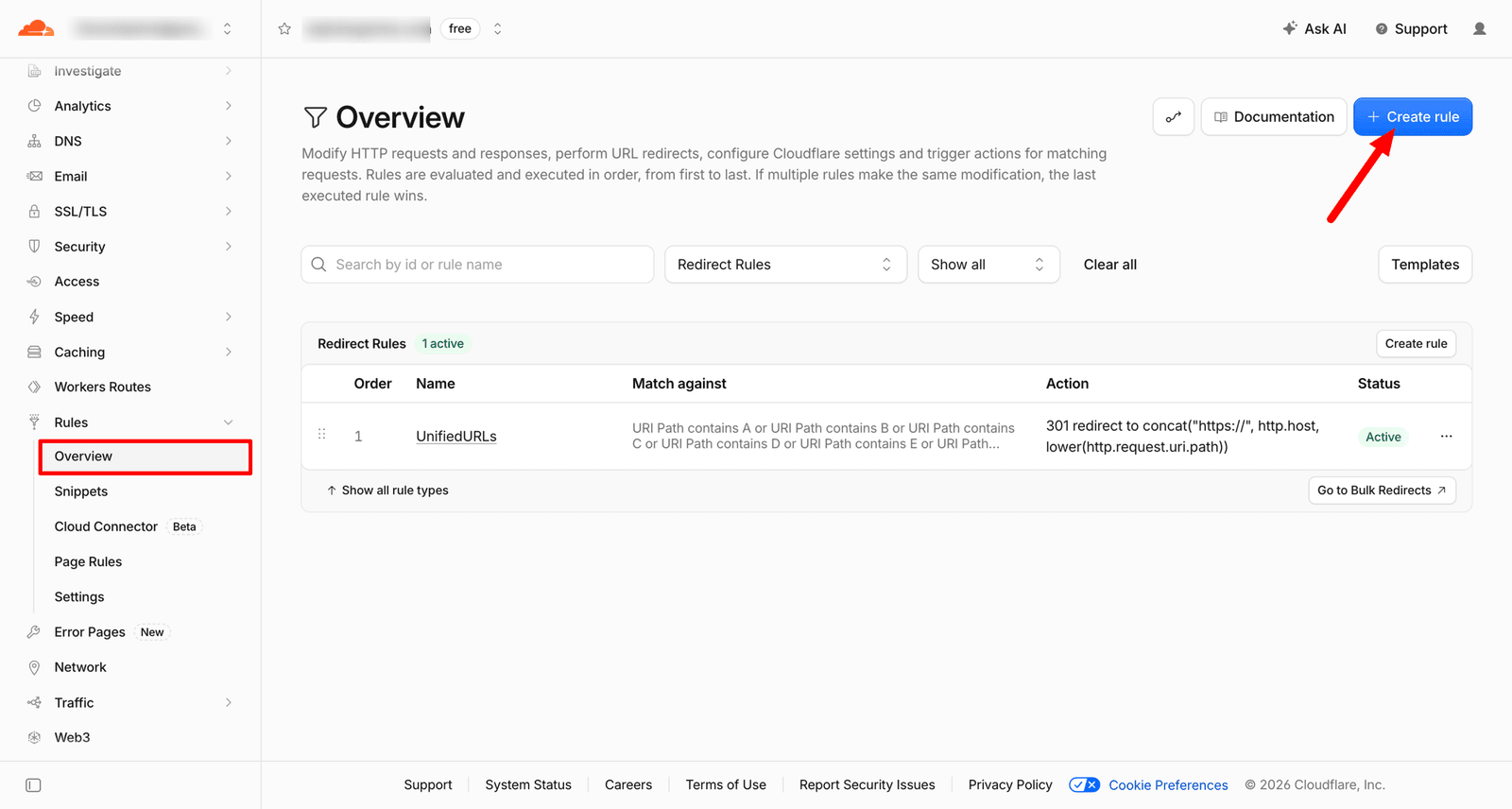
In Cloudflare, select the domain, then open Rules → Overview.
-
Select Create rule, then Redirect Rules.
-
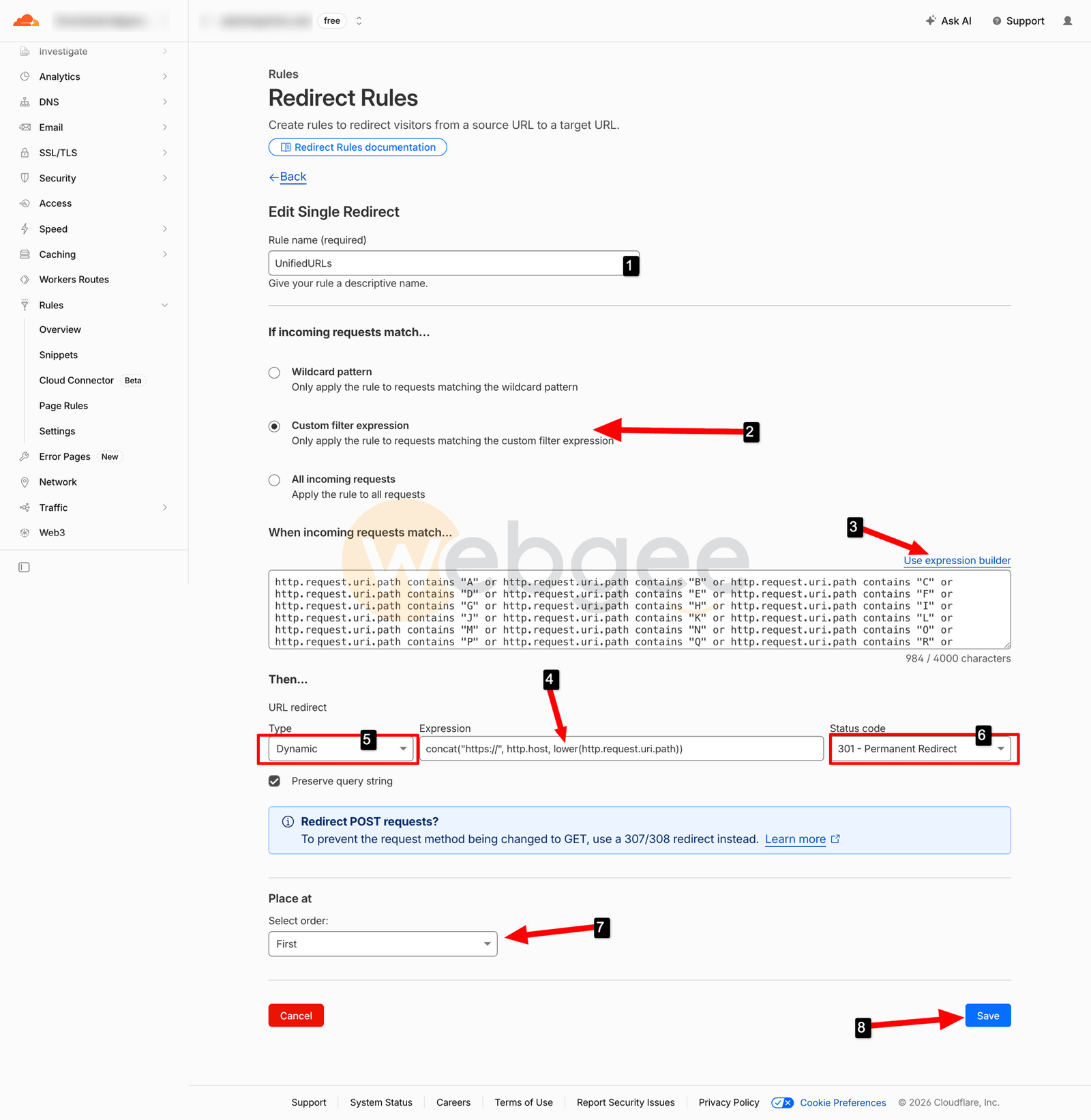
In Rule name, enter a name you will recognise later, such as
UnifiedURLs. -
Under If incoming requests match…, select Custom filter expression.
-
Paste this into the expression box. If the form shows the visual builder rather than a text box, select Edit expression in the corner to switch to text.
(http.request.uri.path contains "A" or http.request.uri.path contains "B" or http.request.uri.path contains "C" or http.request.uri.path contains "D" or http.request.uri.path contains "E" or http.request.uri.path contains "F" or http.request.uri.path contains "G" or http.request.uri.path contains "H" or http.request.uri.path contains "I" or http.request.uri.path contains "J" or http.request.uri.path contains "K" or http.request.uri.path contains "L" or http.request.uri.path contains "M" or http.request.uri.path contains "N" or http.request.uri.path contains "O" or http.request.uri.path contains "P" or http.request.uri.path contains "Q" or http.request.uri.path contains "R" or http.request.uri.path contains "S" or http.request.uri.path contains "T" or http.request.uri.path contains "U" or http.request.uri.path contains "V" or http.request.uri.path contains "W" or http.request.uri.path contains "X" or http.request.uri.path contains "Y" or http.request.uri.path contains "Z") and http.request.uri.path.extension eq ""The obvious version of this is
http.request.uri.path matches "[A-Z]", but thematchesoperator needs a Business or Enterprise plan. The chain ofcontainscomparisons does the same job on every plan. -
Under Then…, set Type to
Dynamicand paste this as the Expression:concat("https://", http.host, lower(http.request.uri.path)) -
Set Status code to
301 - Permanent Redirectand tick Preserve query string. -
Under Place at, select First. The redirect should happen before any other rule does work on a URL that is about to change.
-
Select Save.
http.request.uri.path.extension eq "" is the half of the expression that
keeps real files out of the redirect, and it matters. Uploads are full of
names like IMG_2024.jpg and Banner-Photo.png, and the filesystem is
case-sensitive — lowercasing those paths turns working images into 404s. Leave
it in. The exception is a site whose permalinks end in .html: those pages are
excluded along with the files.
Why 301 and not 302
A permanent redirect tells search engines to consolidate ranking signals onto the lowercase URL instead of indexing both. Browsers and downstream caches also store a 301, so a repeat visit to the capitalised URL is redirected without another round trip to Cloudflare.
Check it worked
The capitalised URL should now answer with a redirect:
curl -sI https://example.com/Blog/My-Great-Article | head -n 3Look for HTTP/2 301 and location: https://example.com/blog/my-great-article.
Request the lowercase URL twice and check that it is cached:
curl -sI https://example.com/blog/my-great-article | grep -i litespeedThe second request should return x-litespeed-cache: hit — see
Check whether LiteSpeed Cache is working.
Then confirm a file with capitals in its name still loads. This must return
200:
curl -so /dev/null -w '%{http_code}\n' https://example.com/wp-content/uploads/2026/01/IMG_2024.jpgIf it did not work
- The capitalised URL still returns 200. The hostname is not proxied through Cloudflare — the DNS record needs to be orange-clouded, or rules never see the traffic. Check as well that the rule shows as Active.
- Images have become 404s. The extension test is missing, or the brackets
around the
orchain were dropped when pasting.andbinds more tightly thanor, so without the brackets the exclusion applies only to the finalcontains "Z". Correct the expression, then purge the Cloudflare cache: the wrong redirect has been cached. - The site is in a redirect loop. Something is sending the lowercase URL
back to a capitalised one — a plugin, a
.htaccessrule, or a WordPress Site Address saved with a capital letter. Fix it at that end rather than removing this rule. - A URL still behaves the old way after you edit the rule. Browsers cache
301s aggressively. Test with
curlor a private window rather than the tab you have been using.
Why this cannot go in .htaccess
The snippet that circulates for this problem uses a rewrite map:
RewriteMap lc int:tolowerRewriteMap is valid only in server config and virtual host context, in Apache
and in LiteSpeed alike. In a .htaccess file Apache returns a 500 error, and on
shared hosting you have no access to the level where the directive would be
allowed. There is no .htaccess-only equivalent — mod_rewrite cannot change the
case of a string without a map.
If the site is not behind Cloudflare, do it in PHP instead. Create
wp-content/mu-plugins/ if it does not exist, and save this as
wp-content/mu-plugins/lowercase-urls.php. Must-use plugins load automatically
and need no activation:
<?php
/**
 * Plugin Name: Lowercase URL redirect
 */
add_action( 'init', function () {
	if ( is_admin() || wp_doing_ajax() || 'GET' !== ( $_SERVER['REQUEST_METHOD'] ?? '' ) ) {
		return;
	}

	$parts = explode( '?', $_SERVER['REQUEST_URI'] ?? '', 2 );
	$path  = $parts[0];

	if ( $path === strtolower( $path ) || strpos( $path, '/wp-json/' ) === 0 ) {
		return;
	}

	wp_safe_redirect( strtolower( $path ) . ( isset( $parts[1] ) ? '?' . $parts[1] : '' ), 301 );
	exit;
} );
This only runs for requests WordPress handles, so files in wp-content/uploads
are never touched. It is a fallback rather than a replacement: the request still
reaches PHP, which is the work the Cloudflare rule avoids entirely.