

WordPress Multisite with subdomains
Point each Multisite subdomain at the network's document root in cPanel or DirectAdmin, so the sites resolve instead of 404ing.
A WordPress Multisite network using subdomains needs each subdomain created in the control panel and pointed at the network's document root, not at a directory of its own. Applies to shared and reseller hosting on cPanel and DirectAdmin.
Multisite serves every site from one WordPress installation and decides which site to show from the hostname in the request. If a subdomain has its own document root, the request never reaches WordPress and you get an empty directory or a 404.
cPanel
Go to Domains → Create a new domain.
Enter the subdomain and set the document root to the same directory as the Multisite installation.
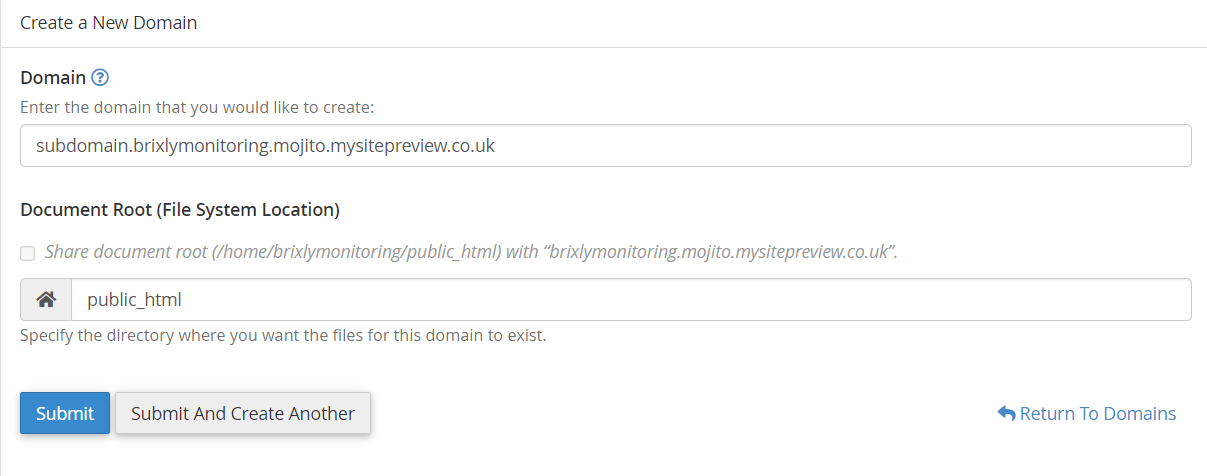
That is normally public_html. If the network runs on an addon domain, use that
domain's directory instead.
cPanel proposes a new subdirectory as the document root by default, such as
public_html/shop. Accepting it is what breaks Multisite. Overwrite it with
the network's own document root.
Correcting an existing subdomain
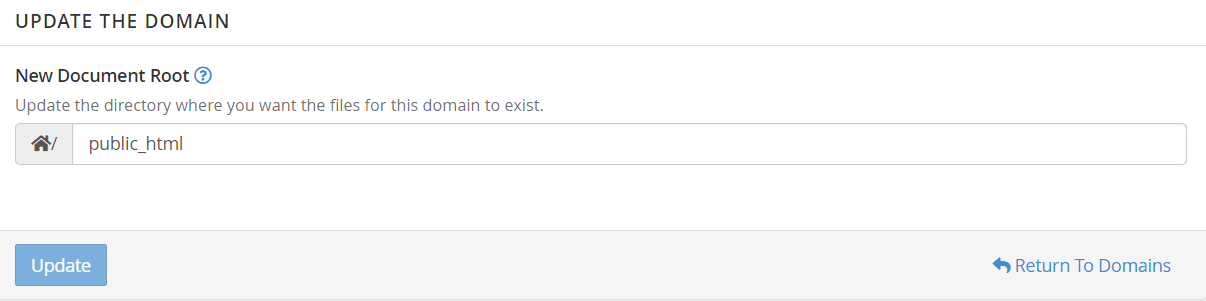
If the subdomain already exists with the wrong root, select Manage beside it on the Domains screen.

Set the new document root and select Update.
DirectAdmin
Go to Subdomain Management → Add Subdomain at user level.
DirectAdmin always creates its own document root, at
/domains/yourdomain/public_html/subdomain, so this must be corrected after
creation rather than during it.
- Select the pencil icon beside Docroot for the new subdomain.
- Set public_html and private_html to custom, both pointing at the Multisite installation's document root.
- Save.

Allow a few minutes for DirectAdmin to rebuild its configuration before testing.
Consider a wildcard instead
Adding a subdomain by hand for every site does not scale, and it is easy to forget when a network lets users create their own sites.
A wildcard subdomain — *.yourdomain.com pointed at the network's document root
— covers every site, present and future, with one entry. Set it up the same way,
using * as the subdomain name. You will also need a wildcard DNS record and,
for HTTPS, a wildcard certificate.
Verify
- The subdomain loads its Multisite site rather than a directory listing or 404.
- It appears correctly under My Sites → Network Admin → Sites.
- HTTPS works. A standard certificate does not cover subdomains; check the padlock on a subdomain, not just the main domain.
Related
Fix MySQL errors when cloning WordPress in Softaculous
Softaculous cannot clone a Multisite network. What the missing-table error means, and which tool to use instead.
Migrate WordPress with Softaculous remote import
Pull a WordPress site from another host into your WebGee account over FTP, with the field-by-field detail the form does not explain.