

تثبيت شهادة SSL مجانية
أصدر شهادة مجانية لنطاقاتك عبر AutoSSL — بما في ذلك الخطوة التي يغفلها معظم الناس، حيث يجب تضمين النطاقات قبل أن يؤمّنها AutoSSL.
تصدر WebGee شهادات SSL مجانية وتجدّدها عبر AutoSSL بلا رسوم طوال عمر الحساب. ينطبق على الاستضافة المشتركة والموزِّعة.
النطاقات الجديدة مستثناة من AutoSSL افتراضيًا. وتشغيل AutoSSL دون تضمينها أولًا لا يفعل شيئًا. وهذه هي الخطوة التي يغفلها معظم الناس، وسبب بقاء موقع بلا شهادة إلى ما لا نهاية.
أصدر شهادتك الأولى
-
في cPanel، افتح SSL/TLS Status في قسم Security.
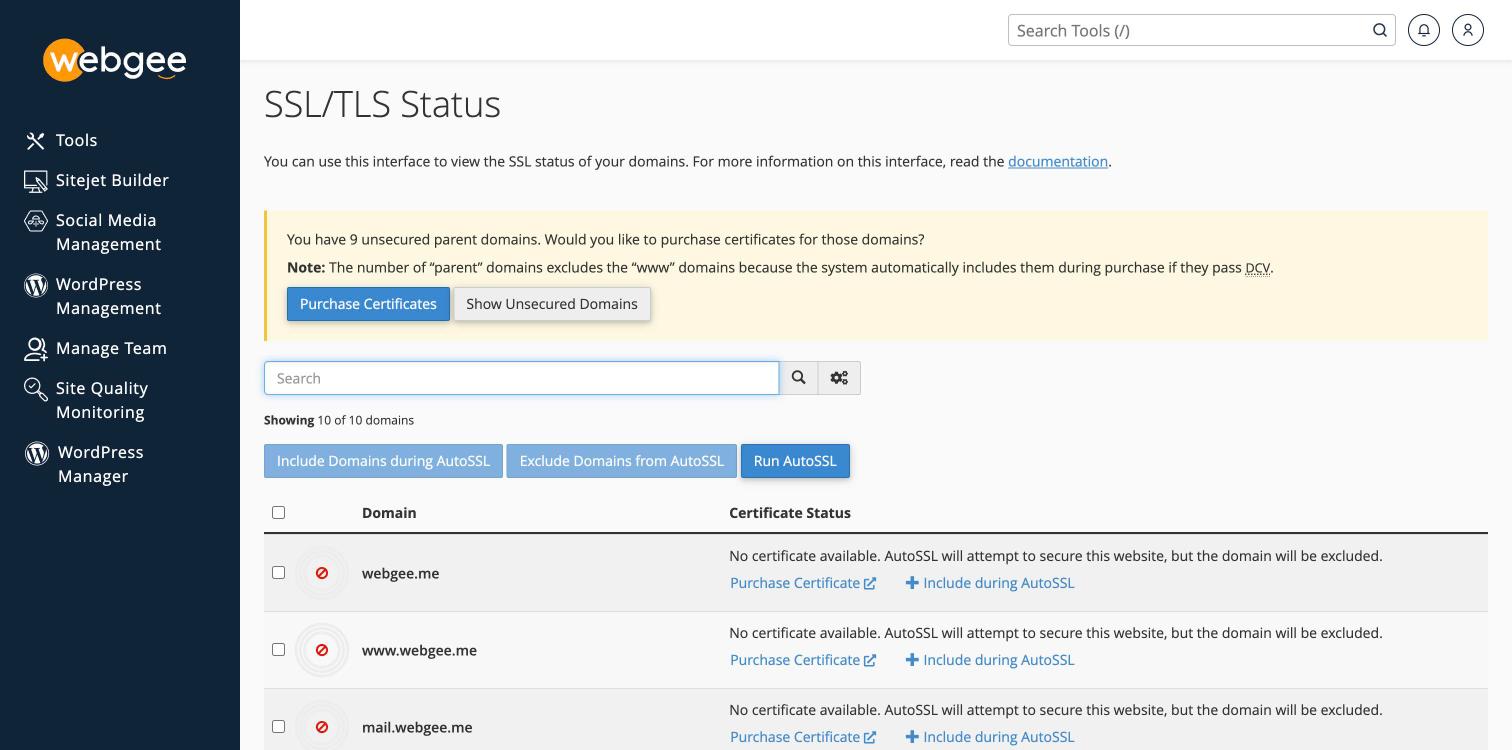
يقرأ كل نطاق "No certificate available. AutoSSL will attempt to secure this website, but the domain will be excluded." وهذه الجملة الأخيرة هي المشكلة.
-
علّم مربع الاختيار في ترويسة الجدول لتحديد كل النطاقات دفعة واحدة.
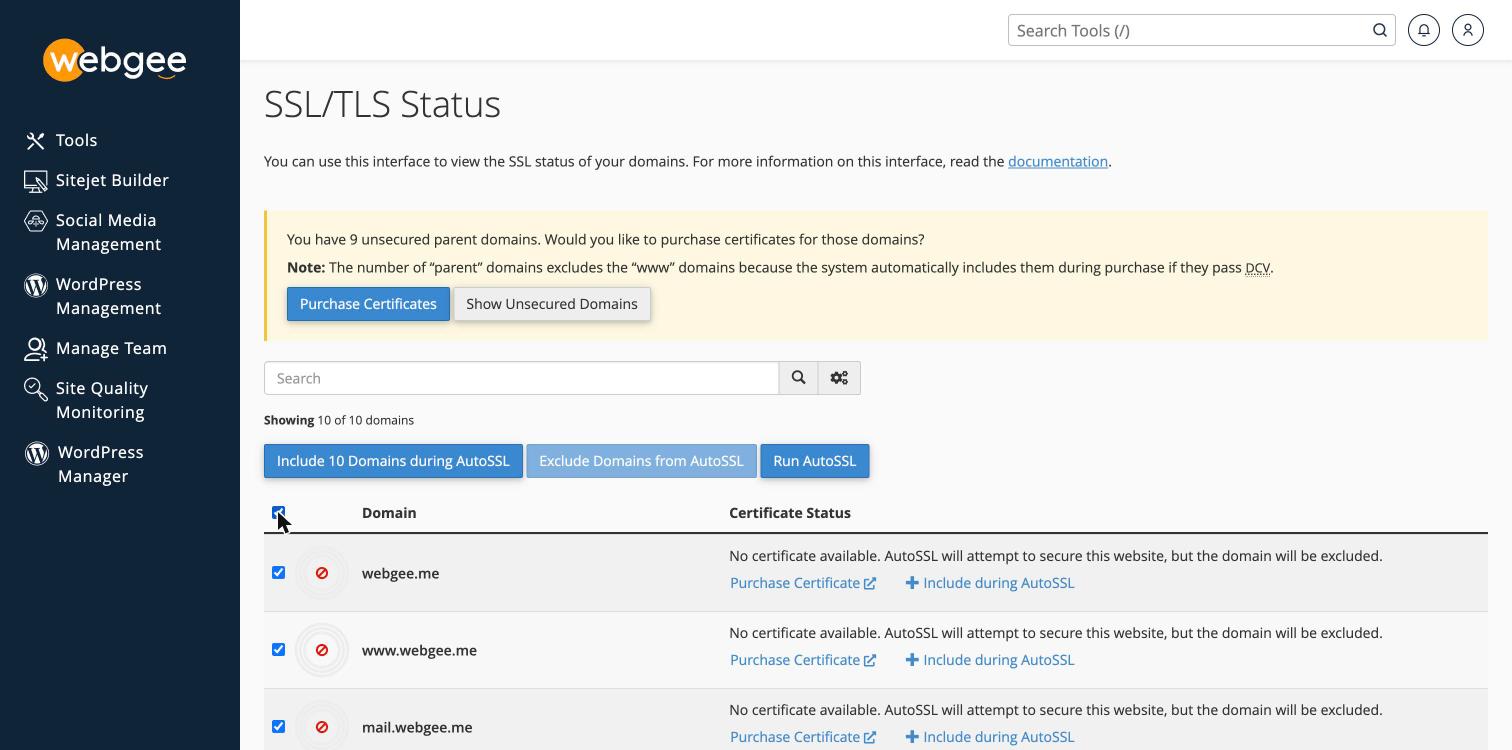
ويتغيّر الزر ليعرض عدد المحدَّد.
-
اختر Include Domains during AutoSSL.
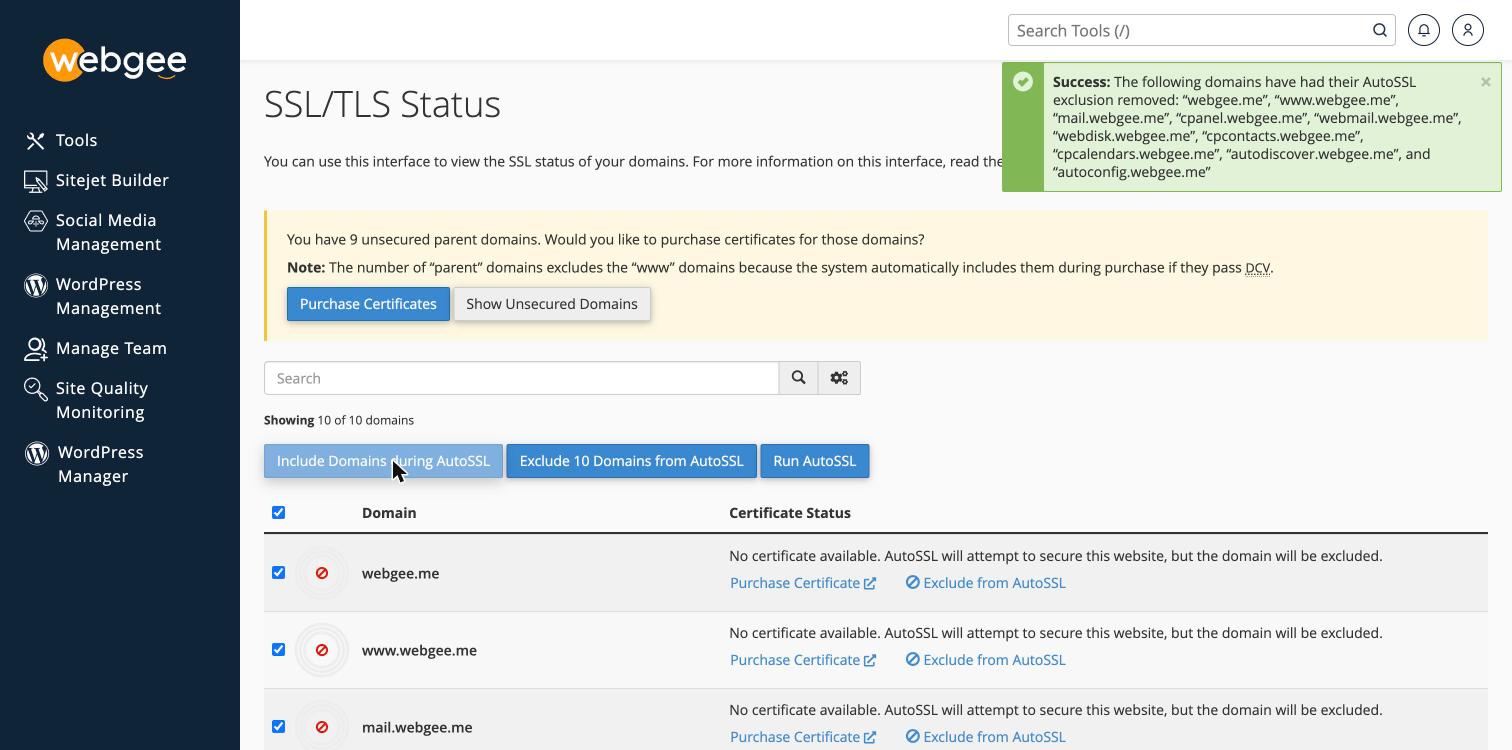
ينبغي أن ترى تأكيدًا يسمّي كل نطاق أُزيل استثناؤه.
-
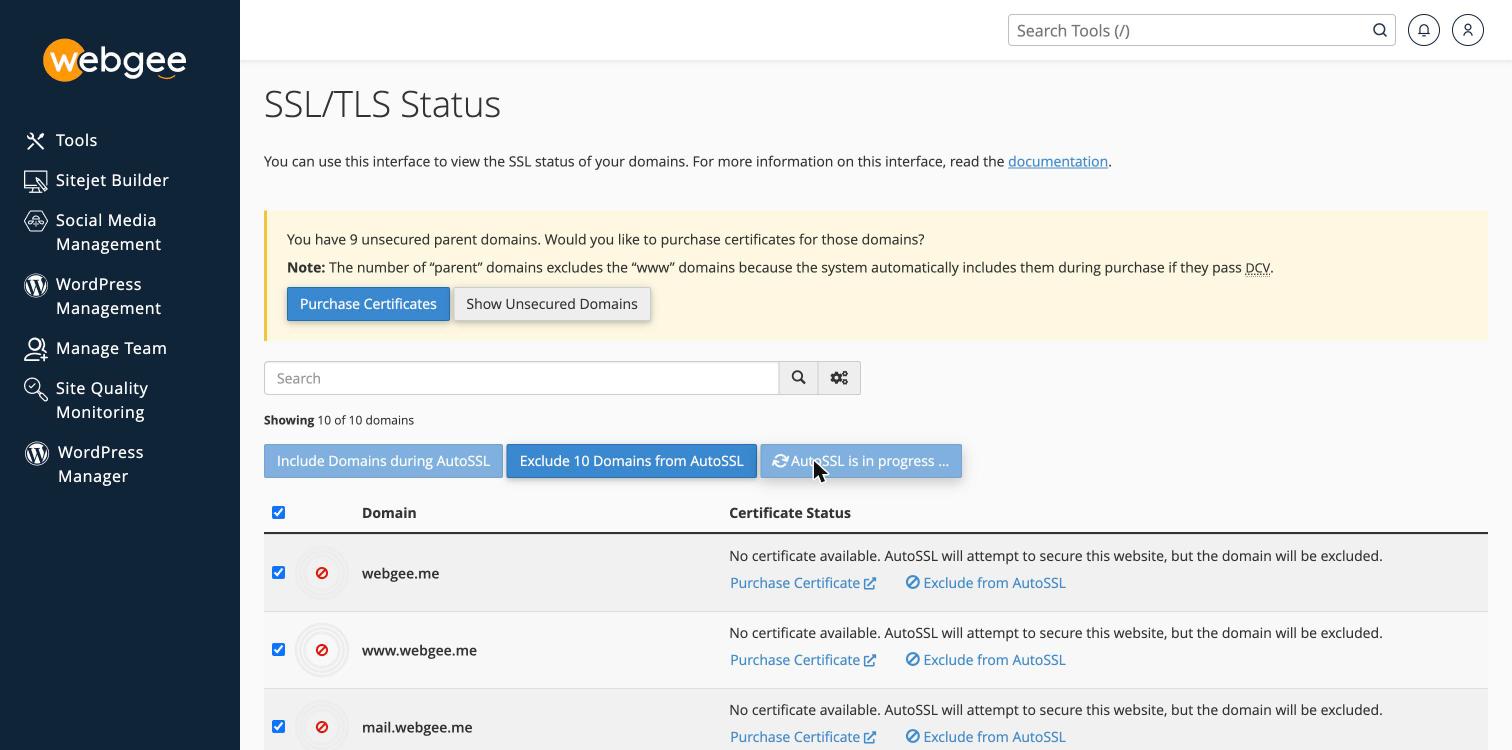
اختر Run AutoSSL.
-
انتظر اكتمال الفحص، ثم أعد تحميل الصفحة.
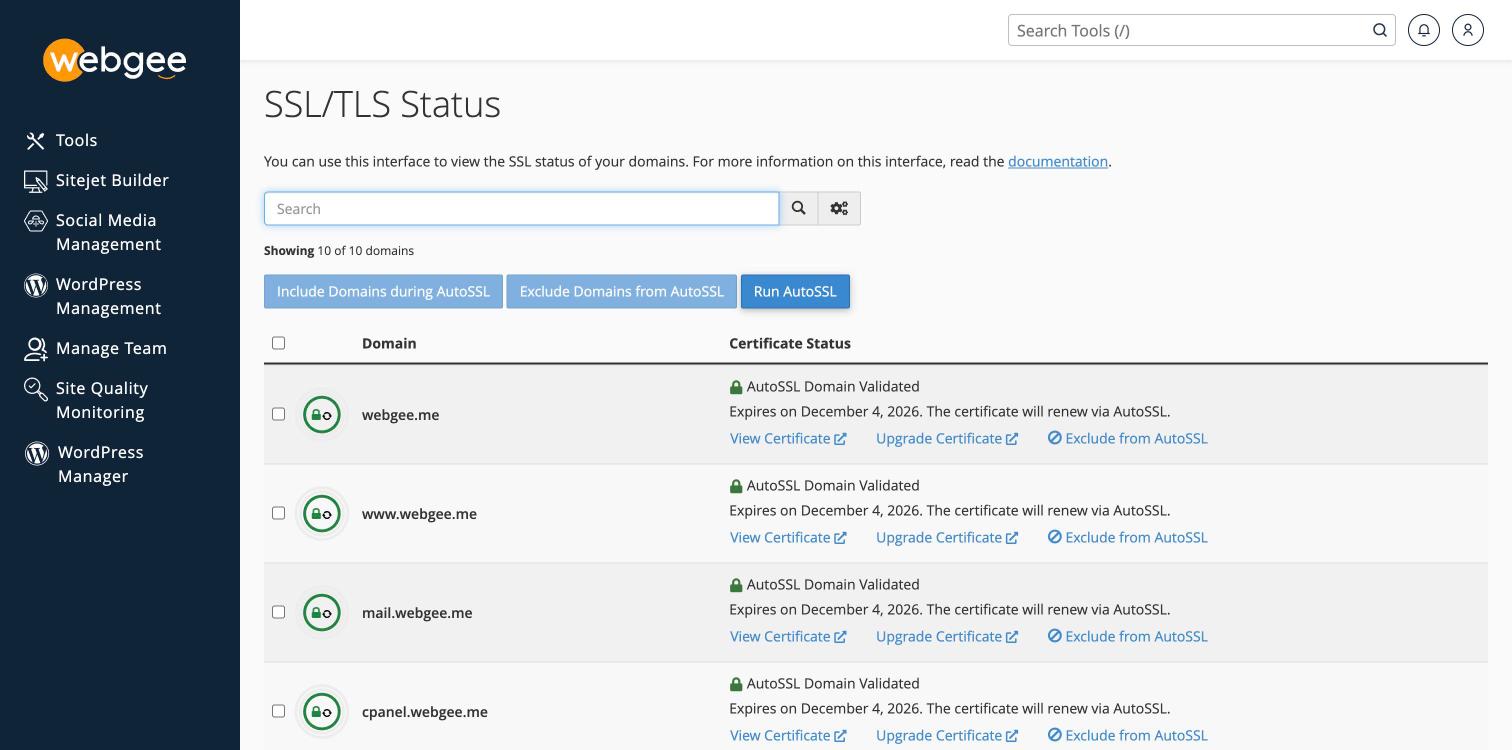
وينبغي أن يعرض كل نطاق الآن قفلًا أخضر، وAutoSSL Domain Validated، وملاحظة تجديد. ويختفي الشريط الخاص بالنطاقات غير المؤمّنة.
والإصدار يستغرق دقيقتين عادةً.
ضمّن كل شيء لا نطاقك الرئيسي فقط
حدّد كل النطاقات لا الذي يستخدمه موقعك وحده. فالقائمة تشمل النطاقات الفرعية الخدمية التي ينشئها cPanel:
mail. · cpanel. · webmail. · webdisk. · cpcontacts. · cpcalendars. ·
autodiscover. · autoconfig.
وهذه أهمّ مما تبدو. فـ mail. هو ما تتصل به برامج البريد، وautodiscover. و
autoconfig. هما ما يتيحان لـ Outlook وApple Mail إعداد نفسيهما. وبلا شهادات،
تنتج تلك الاتصالات تحذيرات أمنية رغم أن الموقع نفسه سليم.
بعد الإصدار
تثبيت شهادة لا يرسل الزوار إلى النسخة الآمنة من موقعك — فذلك إعداد منفصل. راجع فرض HTTPS على موقعك.
تأكّد أنه نجح
زر https://example.com وتأكّد من عدم وجود تحذير في المتصفح. أو من الطرفية:
curl -sI https://example.com | head -n 1وتعرض SSL/TLS Status كذلك شهادة كل نطاق وتاريخ انتهائها.
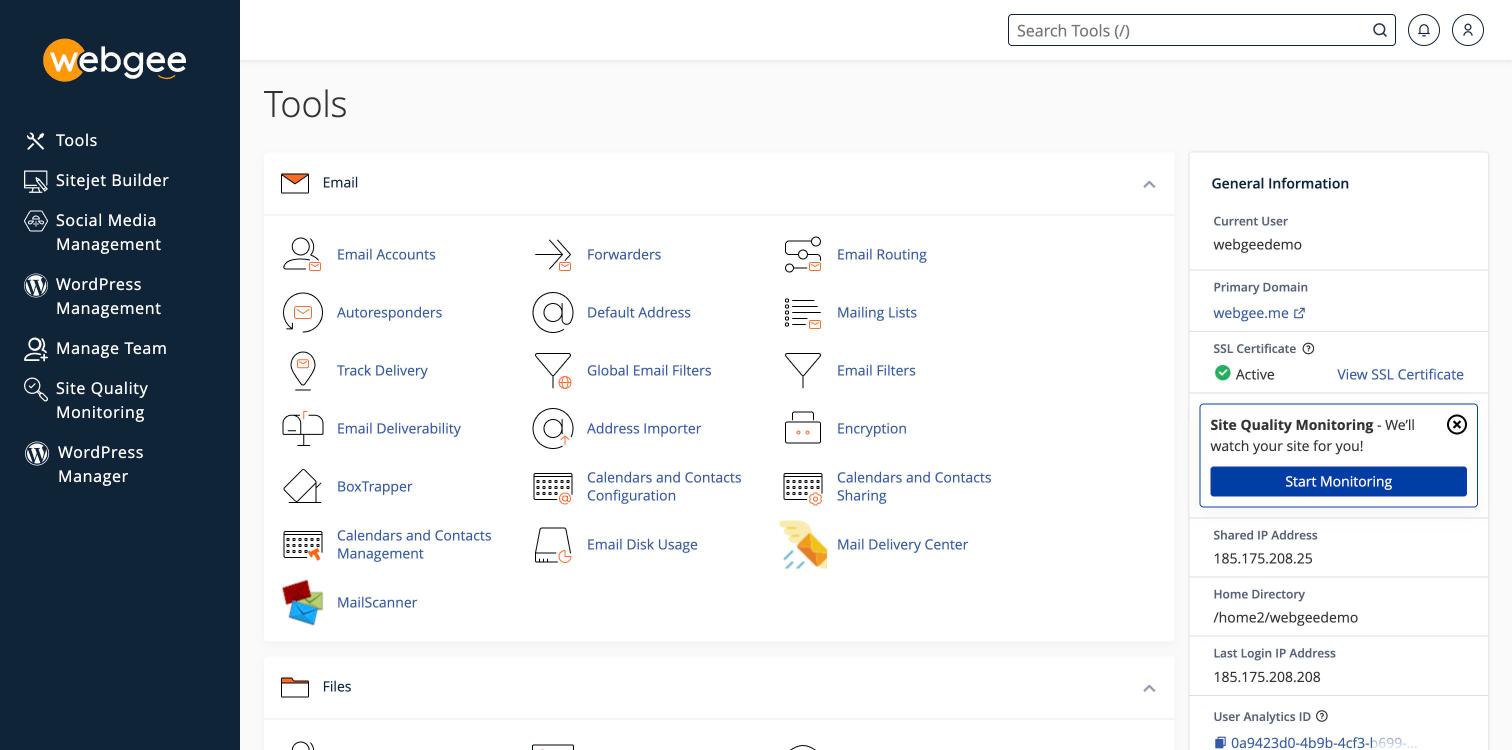
والشريط الجانبي في لوحة cPanel هو أسرع تأكيد. فقبل الإصدار يقرأ Inactive، مع "Your domain is at risk!"؛ وبعده يقرأ Active مع رابط لعرض الشهادة.
عن الشهادات
- تصدرها Sectigo، بتشفير 256 بت.
- صالحة 90 يومًا وتُجدَّد تلقائيًا قبل الانتهاء، فهي عمليًا لا تنقضي.
- مجانية طوال عمر الحساب.
وبعد تضمين نطاق، لا تحتاج التجديدات إلى إجراء آخر — فالتضمين يُفعَل مرة واحدة.
إن تعذّر على AutoSSL الإصدار
النطاق لا يُحلّ إلى حسابك
يثبت AutoSSL تحكّمك في النطاق بجلب ملف منه عبر HTTP. فإن كان النطاق يشير إلى مكان آخر، أو لم ينتشر DNS بعد، فشل التحقّق. افحص بـ معرفة خوادم الأسماء التي يستخدمها نطاقك.
وهذا ثاني أشيع سبب بعد الاستثناء، والاثنان يبدوان متطابقين في الواجهة — فكلاهما يترك النطاق بلا شهادة.
النطاق خاضع لقيود تصدير
لا تستطيع Sectigo الإصدار لنطاقات في ولايات قضائية معيّنة بموجب قانون التصدير الأمريكي: أفغانستان وكوبا وإريتريا وغينيا وإيران وليبيريا وكوريا الشمالية وشمال قبرص والسودان وسيراليون وجنوب السودان وسوريا وزيمبابوي.
ولا يخضع Let's Encrypt لهذا القيد. اختره مزوّدًا في SSL/TLS Status، أو راجع تثبيت شهادة شاملة عبر Let's Encrypt.
تحتاج شهادة شاملة
يصدر AutoSSL شهادات لكل اسم مضيف لا شهادات شاملة. ولـ *.example.com راجع
تثبيت شهادة شاملة عبر Let's Encrypt.
النطاقات الفرعية الخدمية على النطاقات البديلة
لا يغطّي AutoSSL النطاقات الفرعية الخدمية مثل mail. أو cpanel. على النطاقات
البديلة. راجع
لماذا لا يغطي AutoSSL النطاقات الفرعية الخدمية.