

معالجة حلقة «please wait while your request is being verified»
يعلق WHMCS في التحقّق من طلب لأن قاعدة صفحات في Cloudflare تجرّد الكوكي الذي تحتاجه كابتشا Imunify360. عالج قاعدة الصفحات لا WHMCS.
يعلق WHMCS عند «Please wait while your request is being verified» ولا يتابع. ينطبق على حسابات الموزّعين التي مواقعها خلف Cloudflare.
وهذا ليس عطلًا في WHMCS، ولا شيء معطّل على الخادم. والسبب قاعدة صفحات في Cloudflare.
ماذا يحدث
يحمي Imunify360 موقعك بتقديم صفحة كابتشا للزوار غير المعروفين. وحين تجتازها، يضبط Imunify360 كوكيًا يسجّل ذلك، فيمرّ الطلب التالي.
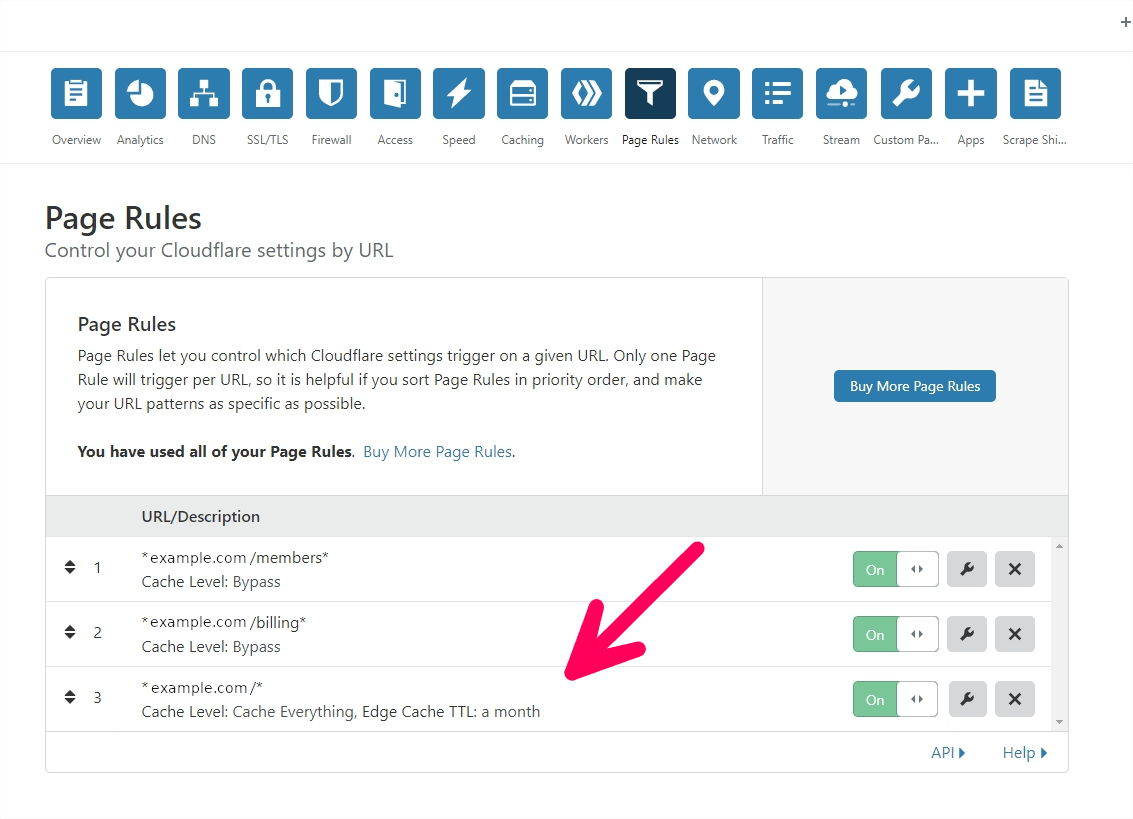
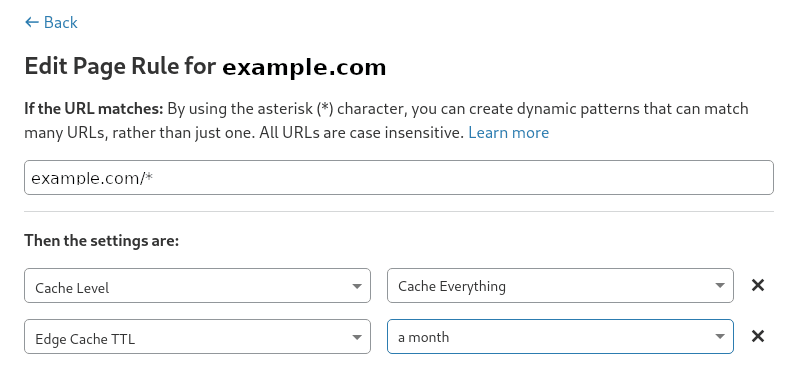
وقاعدة صفحات في Cloudflare تجمع Cache Everything مع Edge Cache TTL أكبر من صفر تجرّد استجابة الأصل من ملفات تعريف الارتباط. فلا يصل كوكي Imunify360 إلى المتصفح، فيبدو كل طلب زيارةً أولى، وتدور الكابتشا إلى الأبد. ويظل WHMCS منتظرًا تحقّقًا لا يمكن أن يكتمل.
وهذا سلوك موثَّق في Cloudflare لا خلل: فـ Cache Everything يحترم عادةً ترويسات
التخزين المؤقت للأصل، لكن جمعه مع Edge Cache TTL يجعل Cloudflare تتجاهلها
وتزيل ملفات تعريف الارتباط.
عالجه
- في Cloudflare، انتقل إلى Rules ← Page Rules.
- اعثر على القاعدة المنطبقة على اسم المضيف المتأثر.
- إما أن تزيل Edge Cache TTL مع إبقاء Cache Everything، أو أن تزيل القاعدة كلها.
- احفظ، ثم طهّر ذاكرة Cloudflare المؤقتة.
لا تضبط Edge Cache TTL مع Cache Everything على أي اسم مضيف يحتاج ملفات تعريف الارتباط — وذلك يشمل WHMCS وcPanel وبريد الويب وأي منطقة مسجَّلة الدخول في موقعك. فالتركيبة تعطّل الجلسات بصمت، لا هذه الكابتشا وحدها.
تأكّد أنه نجح
أعد تحميل الصفحة التي كانت عالقة. وينبغي أن تُتمّ التحقّق وتتابع.
فإن ظلت تدور، فطهّر ذاكرة Cloudflare مرة أخرى وأعد المحاولة في نافذة خاصة — فقد يكون متصفحك خزّن صفحة الكابتشا نفسها.