

Change the SOA record
What the SOA record holds, why the admin email has no @ sign, and when changing it is worth doing.
Change the Start of Authority record for a DNS zone. Applies to reseller accounts with WHM.
Every DNS zone must have an SOA record — it is required by the DNS standards
and is what zone transfers rely on.
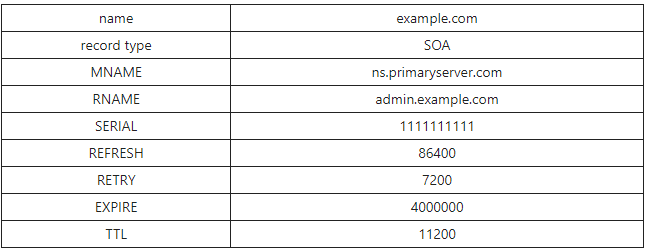
What it holds
| Field | Meaning |
|---|---|
MNAME | The primary nameserver for the zone |
RNAME | The administrator's email address |
Serial | Version number. Increments on every change |
Refresh | How often secondaries check for updates |
Retry | How long to wait after a failed check |
Expire | How long secondaries serve the zone if the primary is unreachable |
TTL | Default caching time for records in the zone |
RNAME has no @ sign and that is correct, not a typo. In an SOA record
the @ is replaced by a dot, so admin.example.com means
admin@example.com. This confuses people every time they first read one.
A consequence: if the local part itself contains a dot —
first.last@example.com — that dot must be escaped as
first\.last.example.com.
Change it
- Sign in to WHM.
- Search for Edit DNS Zone.
- Select the domain.
- Edit the SOA fields.
- Save.
To change the default applied to new zones, use Basic WebHost Manager Setup instead — otherwise you are editing one zone at a time forever.
When it is worth changing
RNAME, so abuse and technical notices reach an address you monitor.MNAME, when using custom nameservers.- TTL, lowered ahead of a planned migration so changes propagate faster.
The timing values are otherwise best left alone — the defaults are sensible, and short refresh intervals mostly generate needless queries.
The serial must increase on every change. WHM handles this for you, but if you edit a zone file by hand and do not increment it, secondary nameservers will not pick up the change — and nothing will indicate why.
Related
Point a domain at an external web service
Send your website to Wix, Squarespace or similar while keeping your email on WebGee — the change that breaks mail if you get it wrong.
Reset a DNS zone to its defaults
Restore a domain's DNS records to cPanel's defaults when a migration or manual edit has left the zone broken.